> ## Documentation Index
> Fetch the complete documentation index at: https://docs.theoptimizer.io/llms.txt
> Use this file to discover all available pages before exploring further.

# Connect Taboola

> Connect your Taboola account to TheOptimizer using API credentials to sync campaign data and enable automated optimisation.

export const ArcadeVideoButton = ({id, title = "Watch interactive demo", label = "Watch Video"}) => {
  const [open, setOpen] = useState(false);
  return <div style={{
    display: 'inline-block'
  }}>
      <button type="button" onClick={() => setOpen(true)} style={{
    display: 'inline-flex',
    alignItems: 'center',
    gap: '8px',
    backgroundColor: '#3e47ec',
    color: '#ffffff',
    border: 'none',
    padding: '10px 18px',
    borderRadius: '8px',
    fontSize: '15px',
    fontWeight: '600',
    cursor: 'pointer'
  }}>
        <svg xmlns="http://www.w3.org/2000/svg" width="16" height="16" viewBox="0 0 24 24" fill="white">
          <polygon points="5,3 19,12 5,21" />
        </svg>
        {label}
      </button>

      {open && <div onClick={() => setOpen(false)} style={{
    position: 'fixed',
    top: 0,
    left: 0,
    width: '100%',
    height: '100%',
    backgroundColor: 'rgba(0, 0, 0, 0.85)',
    zIndex: 9999999,
    display: 'flex',
    alignItems: 'center',
    justifyContent: 'center'
  }}>
          <div onClick={e => e.stopPropagation()} style={{
    width: '90%',
    maxWidth: '1100px',
    aspectRatio: '16 / 9',
    borderRadius: '12px',
    overflow: 'hidden',
    position: 'relative'
  }}>
            <iframe src={`https://demo.arcade.software/${id}?embed&embed_mobile=tab&embed_desktop=inline&show_copy_link=true`} title={title} frameBorder="0" loading="lazy" allowFullScreen allow="clipboard-write" style={{
    width: '100%',
    height: '100%',
    border: 'none',
    colorScheme: 'light'
  }} />
          </div>

          <button type="button" onClick={() => setOpen(false)} style={{
    position: 'fixed',
    top: '20px',
    right: '24px',
    background: 'rgba(255,255,255,0.15)',
    border: 'none',
    color: '#ffffff',
    fontSize: '24px',
    lineHeight: 1,
    width: '40px',
    height: '40px',
    borderRadius: '50%',
    cursor: 'pointer',
    display: 'flex',
    alignItems: 'center',
    justifyContent: 'center'
  }}>
            ✕
          </button>
        </div>}
    </div>;
};

export const ArcadePopoutModal = ({id, title = "Interactive demo"}) => {
  const [isPopout, setIsPopout] = useState(false);
  const iframeRef = useRef(null);
  useEffect(() => {
    function onArcadeIframeMessage(e) {
      if (e.origin !== 'https://demo.arcade.software' || !e.isTrusted) return;
      if (!iframeRef.current || !iframeRef.current.contentWindow) return;
      if (e.data.event === 'arcade-init') {
        iframeRef.current.contentWindow.postMessage({
          event: 'register-popout-handler'
        }, '*');
      }
      if (e.data.event === 'arcade-popout-open') {
        setIsPopout(true);
      }
      if (e.data.event === 'arcade-popout-close') {
        setIsPopout(false);
      }
    }
    window.addEventListener('message', onArcadeIframeMessage);
    return () => window.removeEventListener('message', onArcadeIframeMessage);
  }, []);
  return <div style={{
    position: 'relative',
    paddingBottom: 'calc(54.4737% + 41px)',
    height: 0,
    width: '100%'
  }}>
      <iframe ref={iframeRef} src={`https://demo.arcade.software/${id}?embed&embed_mobile=tab&embed_desktop=modal&show_copy_link=true`} title={title} frameBorder="0" loading="lazy" allowFullScreen allow="clipboard-write" style={{
    position: isPopout ? 'fixed' : 'absolute',
    top: 0,
    left: 0,
    width: '100%',
    height: '100%',
    zIndex: isPopout ? 9999999 : 'auto',
    colorScheme: 'light'
  }} />
    </div>;
};

Taboola is one of the largest native advertising platforms, delivering content recommendations across a global network of premium publishers. It is widely used by performance marketers running native campaigns for lead generation, e-commerce, and content monetisation.

Taboola connects via API credentials — you generate a Client ID and Client Secret from the Taboola Backstage settings and paste them into TheOptimizer.

***

## Where to Find Your API Credentials

Log in to **Taboola Backstage** → click your account name → **My Account** → go to **API Management** → generate your **Client ID** and **Client Secret**. Copy both values before closing the page.

***

## Connecting to TheOptimizer

<Steps>
  <Step title="Open the Integrations page">
    From the left-hand menu, go to **Integrations**. Find the **Taboola** card and click **Connect →**.
  </Step>

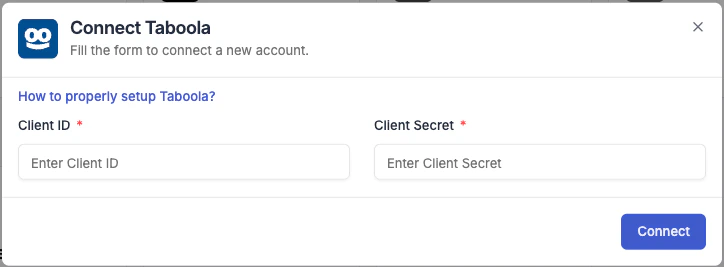
  <Step title="Enter Your API Credentials">
    Enter the credentials requested:

    * **Integration name** — a descriptive label for this connection (e.g. "Taboola – Main Account").
    * **Client ID** — paste the Client ID from Taboola Backstage.
    * **Client Secret** — paste the Client Secret from Taboola Backstage.

    Give the integration a descriptive name so it's easy to identify if you manage multiple accounts.

    <Frame>
      <img src="https://mintcdn.com/theoptimizer/YyOZJpa0RkIUYLFP/images/taboola.png?fit=max&auto=format&n=YyOZJpa0RkIUYLFP&q=85&s=034642ff1f8b10e0f2d7fdfb0bd52559" alt="Taboola connection form in TheOptimizer" width="724" height="267" data-path="images/taboola.png" />
    </Frame>
  </Step>

  <Step title="Connection confirmed">
    Once credentials are accepted, TheOptimizer begins syncing your campaign data. Initial sync takes up to 20–30 minutes.

    <Note>
      If you have multiple ad accounts under this network, they will all be pulled in and listed under this integration after the initial sync.
    </Note>
  </Step>
</Steps>

***

## Custom Events

TheOptimizer can now import **any custom event** — and its revenue — from Taboola, not just the single main conversion event. Sync them from the **Custom Events** tab inside the integration, then use them in reporting, as conditions in rules, and in custom metrics.

See [Custom Events](/integrations/custom-events) for the full setup.

***

## Next Steps

* [Custom Events](/integrations/custom-events) — import any custom event and its revenue into reporting, rules, and custom metrics
* Connect a tracking platform to bring conversion and revenue data into your campaign reports