> ## Documentation Index
> Fetch the complete documentation index at: https://docs.theoptimizer.io/llms.txt
> Use this file to discover all available pages before exploring further.

# Connect Yahoo DSP

> Connect your Yahoo DSP account to TheOptimizer using API credentials to sync campaign data and enable automated optimisation.

export const ArcadeVideoButton = ({id, title = "Watch interactive demo", label = "Watch Video"}) => {
  const [open, setOpen] = useState(false);
  return <div style={{
    display: 'inline-block'
  }}>
      <button type="button" onClick={() => setOpen(true)} style={{
    display: 'inline-flex',
    alignItems: 'center',
    gap: '8px',
    backgroundColor: '#3e47ec',
    color: '#ffffff',
    border: 'none',
    padding: '10px 18px',
    borderRadius: '8px',
    fontSize: '15px',
    fontWeight: '600',
    cursor: 'pointer'
  }}>
        <svg xmlns="http://www.w3.org/2000/svg" width="16" height="16" viewBox="0 0 24 24" fill="white">
          <polygon points="5,3 19,12 5,21" />
        </svg>
        {label}
      </button>

      {open && <div onClick={() => setOpen(false)} style={{
    position: 'fixed',
    top: 0,
    left: 0,
    width: '100%',
    height: '100%',
    backgroundColor: 'rgba(0, 0, 0, 0.85)',
    zIndex: 9999999,
    display: 'flex',
    alignItems: 'center',
    justifyContent: 'center'
  }}>
          <div onClick={e => e.stopPropagation()} style={{
    width: '90%',
    maxWidth: '1100px',
    aspectRatio: '16 / 9',
    borderRadius: '12px',
    overflow: 'hidden',
    position: 'relative'
  }}>
            <iframe src={`https://demo.arcade.software/${id}?embed&embed_mobile=tab&embed_desktop=inline&show_copy_link=true`} title={title} frameBorder="0" loading="lazy" allowFullScreen allow="clipboard-write" style={{
    width: '100%',
    height: '100%',
    border: 'none',
    colorScheme: 'light'
  }} />
          </div>

          <button type="button" onClick={() => setOpen(false)} style={{
    position: 'fixed',
    top: '20px',
    right: '24px',
    background: 'rgba(255,255,255,0.15)',
    border: 'none',
    color: '#ffffff',
    fontSize: '24px',
    lineHeight: 1,
    width: '40px',
    height: '40px',
    borderRadius: '50%',
    cursor: 'pointer',
    display: 'flex',
    alignItems: 'center',
    justifyContent: 'center'
  }}>
            ✕
          </button>
        </div>}
    </div>;
};

export const ArcadePopoutModal = ({id, title = "Interactive demo"}) => {
  const [isPopout, setIsPopout] = useState(false);
  const iframeRef = useRef(null);
  useEffect(() => {
    function onArcadeIframeMessage(e) {
      if (e.origin !== 'https://demo.arcade.software' || !e.isTrusted) return;
      if (!iframeRef.current || !iframeRef.current.contentWindow) return;
      if (e.data.event === 'arcade-init') {
        iframeRef.current.contentWindow.postMessage({
          event: 'register-popout-handler'
        }, '*');
      }
      if (e.data.event === 'arcade-popout-open') {
        setIsPopout(true);
      }
      if (e.data.event === 'arcade-popout-close') {
        setIsPopout(false);
      }
    }
    window.addEventListener('message', onArcadeIframeMessage);
    return () => window.removeEventListener('message', onArcadeIframeMessage);
  }, []);
  return <div style={{
    position: 'relative',
    paddingBottom: 'calc(54.4737% + 41px)',
    height: 0,
    width: '100%'
  }}>
      <iframe ref={iframeRef} src={`https://demo.arcade.software/${id}?embed&embed_mobile=tab&embed_desktop=modal&show_copy_link=true`} title={title} frameBorder="0" loading="lazy" allowFullScreen allow="clipboard-write" style={{
    position: isPopout ? 'fixed' : 'absolute',
    top: 0,
    left: 0,
    width: '100%',
    height: '100%',
    zIndex: isPopout ? 9999999 : 'auto',
    colorScheme: 'light'
  }} />
    </div>;
};

<Note>
  Yahoo DSP integration is currently in **Beta**. Access may be limited. Contact your Yahoo account manager or TheOptimizer support to confirm availability for your account.
</Note>

Yahoo DSP (Demand Side Platform) is Yahoo's programmatic advertising platform, offering access to display, native, and video inventory across Yahoo's owned properties and the broader open web. It is used by performance marketers and agencies seeking programmatic reach with first-party Yahoo audience data.

Yahoo DSP connects via API credentials — your Client ID and Client Secret are provided directly by your Yahoo account manager, as they are not self-serve from within the platform UI.

***

## Where to Find Your API Credentials

API credentials for Yahoo DSP are not generated from a self-serve settings panel. Contact your **Yahoo account manager** to request your **Client ID** and **Client Secret** for the Yahoo DSP API.

***

## Connecting to TheOptimizer

<Steps>
  <Step title="Open the Integrations page">
    From the left-hand menu, go to **Integrations**. Find the **Yahoo DSP** card and click **Connect →**.
  </Step>

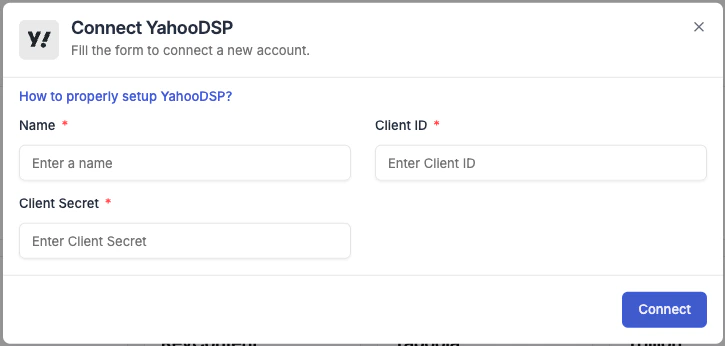
  <Step title="Enter Your API Credentials">
    Enter the credentials requested:

    * **Integration name** — a descriptive label for this connection (e.g. "Yahoo DSP – Main Account").
    * **Client ID** — paste the Client ID provided by your Yahoo account manager.
    * **Client Secret** — paste the Client Secret provided by your Yahoo account manager.

    Give the integration a descriptive name so it's easy to identify if you manage multiple accounts.

    <Frame>
      <img src="https://mintcdn.com/theoptimizer/YyOZJpa0RkIUYLFP/images/yahoodsp.png?fit=max&auto=format&n=YyOZJpa0RkIUYLFP&q=85&s=01e87b4792f51a1d3ce20c281ea99353" alt="Yahoo DSP connection form in TheOptimizer" width="725" height="346" data-path="images/yahoodsp.png" />
    </Frame>
  </Step>

  <Step title="Connection confirmed">
    Once credentials are accepted, TheOptimizer begins syncing your campaign data. Initial sync takes up to 20–30 minutes.

    <Note>
      If you have multiple ad accounts under this network, they will all be pulled in and listed under this integration after the initial sync.
    </Note>
  </Step>
</Steps>

***

## Next Steps

* Connect a tracking platform to bring conversion and revenue data into your campaign reports