> ## Documentation Index
> Fetch the complete documentation index at: https://docs.theoptimizer.io/llms.txt
> Use this file to discover all available pages before exploring further.
# Rule Chains: Build Multi-Step Automation Strategies
> Use tags to chain automation rules into multi-step sequences — so each rule picks up where the previous one left off. Includes three complete chain examples.
export const ArcadeVideoButton = ({id, title = "Watch interactive demo", label = "Watch Video"}) => {
const [open, setOpen] = useState(false);
return
;
};
Automation rules are powerful on their own, but individually they only react to a single moment in time. **Rule chains** let you build sequences of rules that execute in a deliberate order — each rule picking up exactly where the previous one left off. The mechanism that makes this possible is **tags**: structured labels you attach to campaigns, ad sets, ads, or sites that carry history forward from one rule to the next.
***
## How rule chains work
Every rule in TheOptimizer can be configured to **add** or **remove** tags from the items it acts on. Those tags then become available as conditions in other rules, so you can create logic like: "Only run this rule on campaigns that have already been processed by that other rule."
This creates a pipeline: Rule A fires and tags the item, and Rule B is waiting for exactly that tag before it acts.
**Example**: Rule checks for tags using the "Tags" condition.
**Example**: Rule Adds and/or Removes Tags once it finishes the execution. It prepares the campaign, ad set or ad for the next stage.
**The key principle:** a tag is a signal that something has already happened. It carries history forward.
***
## Setting up tags on a rule
When editing any rule, navigate to the **Auto Tags** section.
* **Tags to Add** — one or more tags applied to every item the rule acts on when it fires.
* **Tags to Remove** — tags stripped from items when the rule fires (useful for clearing a stage so an item can move to the next one).
Tags are applied immediately after the rule's main action executes. If a rule pauses a campaign, the tags are added or removed from that campaign at the same time.
To use a tag as a **condition** in another rule, add a condition in Step 2 (Conditions) using the **Tags** field:
| Field | Condition | Value |
| ----- | --------- | --------------- |
| Tags | Contains | `your-tag-name` |
This ensures the downstream rule only applies to items that carry that tag.
Use descriptive, stage-based tag names rather than rule-based ones. `passed-learning` or `budget-scaled-once` are far more readable at a glance than `rule3-fired`. Name the stage, not the rule.
***
## Example chains
### 1. The Probation Chain — pause, wait, re-test
**Goal:** Pause campaigns that lose money, hold them for a cooling-off period, then automatically reactivate them for a second chance before deciding whether to kill them permanently.
**Why chain this?** A direct pause-and-forget rule loses campaigns that may have had a bad day. This chain distinguishes between temporary underperformers and genuine losers.
Fires when a campaign has spent enough to judge performance and is not profitable.
| Metric | Condition | Value |
| ------ | ------------ | ----- |
| Spend | Greater than | \$50 |
| CPA | Greater than | \$40 |
**Action:** Pause Campaign
**Tags to Add:** `on-probation`
**Schedule:** Every 4 hours
Fires on campaigns tagged `on-probation` that have been paused for at least 3 days.
| Metric | Condition | Value |
| ---------------------- | ------------ | -------------- |
| Tags | Contains | `on-probation` |
| Days Since Last Action | Greater than | 3 |
**Action:** Enable Campaign
**Tags to Add:** `retest-round-2` | **Tags to Remove:** `on-probation`
**Schedule:** Once daily
Fires on campaigns tagged `retest-round-2` that are still unprofitable after their second chance.
| Metric | Condition | Value |
| ------ | ------------ | ---------------- |
| Tags | Contains | `retest-round-2` |
| Spend | Greater than | \$30 |
| CPA | Greater than | \$40 |
**Action:** Pause Campaign
**Tags to Add:** `permanent-pause` | **Tags to Remove:** `retest-round-2`
**Schedule:** Every 4 hours
Items tagged `permanent-pause` are excluded from all other rules — preventing them from being re-enabled by broader reactivation rules. Add a condition `Tags does not contain permanent-pause` to any reactivation rule you run.
***
### 2. The Winner Escalation Chain — validate, scale, clone
**Goal:** Automatically move profitable campaigns through a structured scaling process — only unlocking larger budget increases and cloning after sustained performance, not just one good day.
**Why chain this?** Scaling too fast on early signals wastes budget on campaigns that regress. This chain requires proof at each stage before moving to the next.
Fires when a campaign shows early profitability signals.
| Metric | Condition | Value |
| ------ | ------------ | ----- |
| ROAS | Greater than | 200% |
| Spend | Greater than | \$100 |
**Action:** No action (or Send Notification)
**Tags to Add:** `potential-winner`
**Schedule:** Every 6 hours
Fires on campaigns tagged `potential-winner` that maintain profitability over 3 days.
| Metric | Condition | Value |
| ------------------- | ------------ | ------------------ |
| Tags | Contains | `potential-winner` |
| ROAS (last 3 days) | Greater than | 200% |
| Spend (last 3 days) | Greater than | \$200 |
**Action:** Increase Budget by 30%
**Tags to Add:** `scale-stage-1` | **Tags to Remove:** `potential-winner`
**Schedule:** Once daily
Fires on campaigns tagged `scale-stage-1` that are still performing after further spend.
| Metric | Condition | Value |
| ------------------- | ------------ | --------------- |
| Tags | Contains | `scale-stage-1` |
| ROAS (last 7 days) | Greater than | 180% |
| Spend (last 7 days) | Greater than | \$500 |
**Action:** Increase Budget by 50%
**Tags to Add:** `scale-stage-2` | **Tags to Remove:** `scale-stage-1`
**Schedule:** Once daily
Fires on campaigns tagged `scale-stage-2` with sustained, strong ROAS — duplicating the campaign to expand reach.
| Metric | Condition | Value |
| ------------------- | ------------ | --------------- |
| Tags | Contains | `scale-stage-2` |
| ROAS (last 14 days) | Greater than | 180% |
**Action:** Clone Campaign
**Tags to Add:** `cloned` | **Tags to Remove:** `scale-stage-2`
**Schedule:** Once daily
***
### 3. The Creative Fatigue Chain — detect, rotate, retire
**Goal:** Automatically detect when an ad's performance is fading, pause it for a rest period, then reactivate it. If performance doesn't recover, retire it permanently.
**Why chain this?** Creative fatigue is gradual. A single threshold rule either acts too early or too late. This chain catches the decline in stages.
Fires on ads that have been running long enough to have a performance baseline but are showing CTR decline.
| Metric | Condition | Value |
| ----------- | ------------ | ------ |
| Impressions | Greater than | 50,000 |
| CTR | Less than | 0.10% |
| Conversions | Less than | 3 |
**Action:** No action (or Send Notification)
**Tags to Add:** `creative-fatigue`
**Schedule:** Every 6 hours
Fires on ads tagged `creative-fatigue` if CTR has not recovered after 48 hours.
| Metric | Condition | Value |
| ----------------- | --------- | ------------------ |
| Tags | Contains | `creative-fatigue` |
| CTR (last 2 days) | Less than | 0.10% |
**Action:** Pause Ad
**Tags to Add:** `creative-resting` | **Tags to Remove:** `creative-fatigue`
**Schedule:** Every 6 hours
Fires on paused ads tagged `creative-resting` after 7 days, giving them a fresh start.
| Metric | Condition | Value |
| ---------------------- | ------------ | ------------------ |
| Tags | Contains | `creative-resting` |
| Days Since Last Action | Greater than | 7 |
**Action:** Enable Ad
**Tags to Add:** `creative-retest` | **Tags to Remove:** `creative-resting`
**Schedule:** Once daily
Fires on ads tagged `creative-retest` that still aren't converting after their second chance.
| Metric | Condition | Value |
| ------------------------- | ------------ | ----------------- |
| Tags | Contains | `creative-retest` |
| Impressions (last 3 days) | Greater than | 10,000 |
| CTR (last 3 days) | Less than | 0.10% |
**Action:** Pause Ad
**Tags to Add:** `creative-retired` | **Tags to Remove:** `creative-retest`
**Schedule:** Every 6 hours
***
## Tips for building reliable chains
**Keep each rule's job narrow.** A rule in a chain should do one thing — flag, scale, pause, or reactivate. Rules that try to handle multiple stages get hard to debug and maintain.
**Use Tags to Remove to prevent re-entry.** If Rule 2 fires on a tag left in place, it may fire again on the same item on the next run. Always remove the inbound tag once the rule has acted.
**Add a notification at key transitions.** For high-stakes stages — especially scaling or cloning — enable notifications alongside the tag action so you stay informed while the chain runs autonomously.
**Test with small scope first.** Before applying a chain globally, add it to a small group of campaigns using the standard (non-global) rule type. Review the tag history on those campaigns after the first few runs to confirm the flow is working as intended.
Use `permanent-pause` or `retired` tags as circuit breakers. Add a condition `Tags does not contain permanent-pause` to any reactivation rule to ensure items that have been deliberately stopped never get re-enabled by a separate rule.
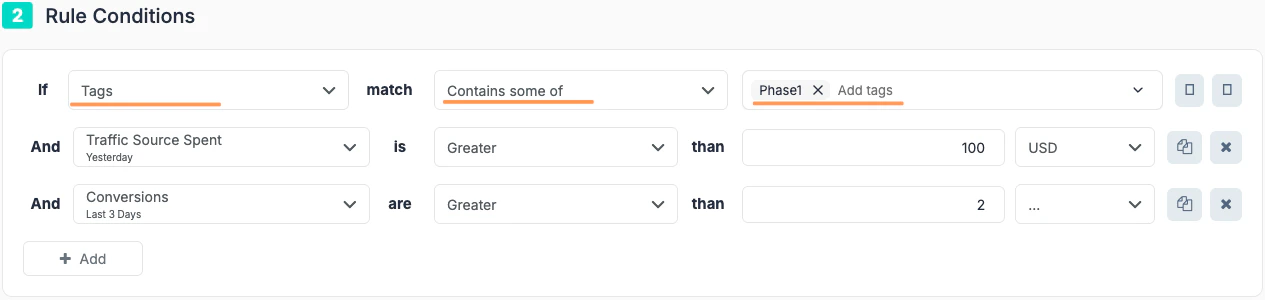 **Example**: Rule Adds and/or Removes Tags once it finishes the execution. It prepares the campaign, ad set or ad for the next stage.
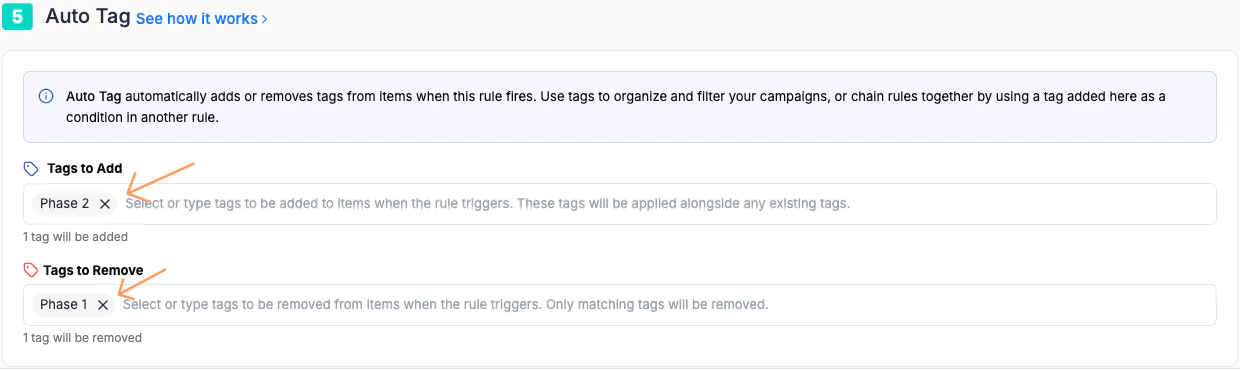 **The key principle:** a tag is a signal that something has already happened. It carries history forward.
***
## Setting up tags on a rule
When editing any rule, navigate to the **Auto Tags** section.
* **Tags to Add** — one or more tags applied to every item the rule acts on when it fires.
* **Tags to Remove** — tags stripped from items when the rule fires (useful for clearing a stage so an item can move to the next one).
**The key principle:** a tag is a signal that something has already happened. It carries history forward.
***
## Setting up tags on a rule
When editing any rule, navigate to the **Auto Tags** section.
* **Tags to Add** — one or more tags applied to every item the rule acts on when it fires.
* **Tags to Remove** — tags stripped from items when the rule fires (useful for clearing a stage so an item can move to the next one).