> ## Documentation Index
> Fetch the complete documentation index at: https://docs.theoptimizer.io/llms.txt
> Use this file to discover all available pages before exploring further.

# Quick & Bulk Actions

> Edit budgets and bids inline, pause or activate individual items, and apply actions to multiple campaigns at once using the bulk action bar.

export const ArcadeVideoButton = ({id, title = "Watch interactive demo", label = "Watch Video"}) => {
  const [open, setOpen] = useState(false);
  return <div style={{
    display: 'inline-block'
  }}>
      <button type="button" onClick={() => setOpen(true)} style={{
    display: 'inline-flex',
    alignItems: 'center',
    gap: '8px',
    backgroundColor: '#3e47ec',
    color: '#ffffff',
    border: 'none',
    padding: '10px 18px',
    borderRadius: '8px',
    fontSize: '15px',
    fontWeight: '600',
    cursor: 'pointer'
  }}>
        <svg xmlns="http://www.w3.org/2000/svg" width="16" height="16" viewBox="0 0 24 24" fill="white">
          <polygon points="5,3 19,12 5,21" />
        </svg>
        {label}
      </button>

      {open && <div onClick={() => setOpen(false)} style={{
    position: 'fixed',
    top: 0,
    left: 0,
    width: '100%',
    height: '100%',
    backgroundColor: 'rgba(0, 0, 0, 0.85)',
    zIndex: 9999999,
    display: 'flex',
    alignItems: 'center',
    justifyContent: 'center'
  }}>
          <div onClick={e => e.stopPropagation()} style={{
    width: '90%',
    maxWidth: '1100px',
    aspectRatio: '16 / 9',
    borderRadius: '12px',
    overflow: 'hidden',
    position: 'relative'
  }}>
            <iframe src={`https://demo.arcade.software/${id}?embed&embed_mobile=tab&embed_desktop=inline&show_copy_link=true`} title={title} frameBorder="0" loading="lazy" allowFullScreen allow="clipboard-write" style={{
    width: '100%',
    height: '100%',
    border: 'none',
    colorScheme: 'light'
  }} />
          </div>

          <button type="button" onClick={() => setOpen(false)} style={{
    position: 'fixed',
    top: '20px',
    right: '24px',
    background: 'rgba(255,255,255,0.15)',
    border: 'none',
    color: '#ffffff',
    fontSize: '24px',
    lineHeight: 1,
    width: '40px',
    height: '40px',
    borderRadius: '50%',
    cursor: 'pointer',
    display: 'flex',
    alignItems: 'center',
    justifyContent: 'center'
  }}>
            ✕
          </button>
        </div>}
    </div>;
};

export const ArcadePopoutModal = ({id, title = "Interactive demo"}) => {
  const [isPopout, setIsPopout] = useState(false);
  const iframeRef = useRef(null);
  useEffect(() => {
    function onArcadeIframeMessage(e) {
      if (e.origin !== 'https://demo.arcade.software' || !e.isTrusted) return;
      if (!iframeRef.current || !iframeRef.current.contentWindow) return;
      if (e.data.event === 'arcade-init') {
        iframeRef.current.contentWindow.postMessage({
          event: 'register-popout-handler'
        }, '*');
      }
      if (e.data.event === 'arcade-popout-open') {
        setIsPopout(true);
      }
      if (e.data.event === 'arcade-popout-close') {
        setIsPopout(false);
      }
    }
    window.addEventListener('message', onArcadeIframeMessage);
    return () => window.removeEventListener('message', onArcadeIframeMessage);
  }, []);
  return <div style={{
    position: 'relative',
    paddingBottom: 'calc(54.4737% + 41px)',
    height: 0,
    width: '100%'
  }}>
      <iframe ref={iframeRef} src={`https://demo.arcade.software/${id}?embed&embed_mobile=tab&embed_desktop=modal&show_copy_link=true`} title={title} frameBorder="0" loading="lazy" allowFullScreen allow="clipboard-write" style={{
    position: isPopout ? 'fixed' : 'absolute',
    top: 0,
    left: 0,
    width: '100%',
    height: '100%',
    zIndex: isPopout ? 9999999 : 'auto',
    colorScheme: 'light'
  }} />
    </div>;
};

## Inline Actions

For individual items, several actions are available directly in the table row without opening any dialog:

<Frame>
  <img src="https://mintcdn.com/theoptimizer/d8i_PgwXHcJW-VUm/images/campaign-hover-options.png?fit=max&auto=format&n=d8i_PgwXHcJW-VUm&q=85&s=186777540d2625619d7bc1367c1da4a4" alt="Campaign Hover Options" width="2454" height="1704" data-path="images/campaign-hover-options.png" />
</Frame>

* **On/Off toggle** — the toggle at the left of each row pauses or activates the item immediately.
* **Budget** — if the budget cell is editable (indicated by a pencil icon on hover), click it to modify the daily or lifetime budget inline.
* **Bid** — bid values can be edited inline where supported by the ad network.

Click the value, make your change, and press **Enter** to confirm or **Escape** to cancel.

### Name Hover Options

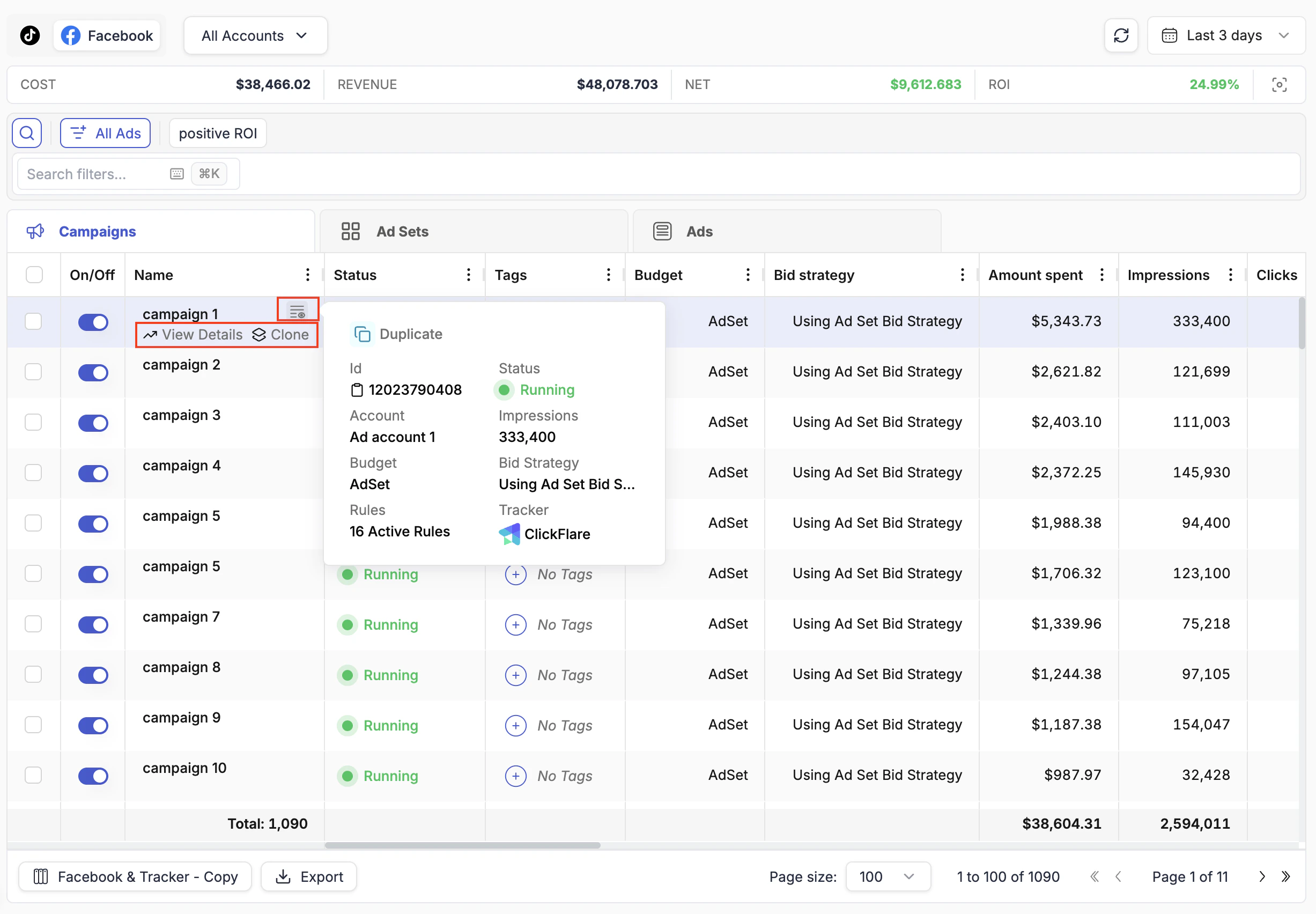
Hovering over any campaign, ad set, or ad name in the table reveals three additional options to the right of the name:

| Option                        | What it does                                                                                            |
| ----------------------------- | ------------------------------------------------------------------------------------------------------- |
| **View Details**              | Opens the full Details View side panel for that item                                                    |
| **Clone**                     | Starts the cloning workflow for the campaign, ad set, or ad                                             |
| **Quick Details** (info icon) | Shows a compact popup with the campaign ID, ad account, advertising objective, budget, and bid strategy |
<Tip>
  Use **Quick Details** to copy a campaign ID instantly. Hover over the campaign name, click the info icon, and the ID is right there — no need to open the full campaign settings.
</Tip>

***

## Bulk Actions

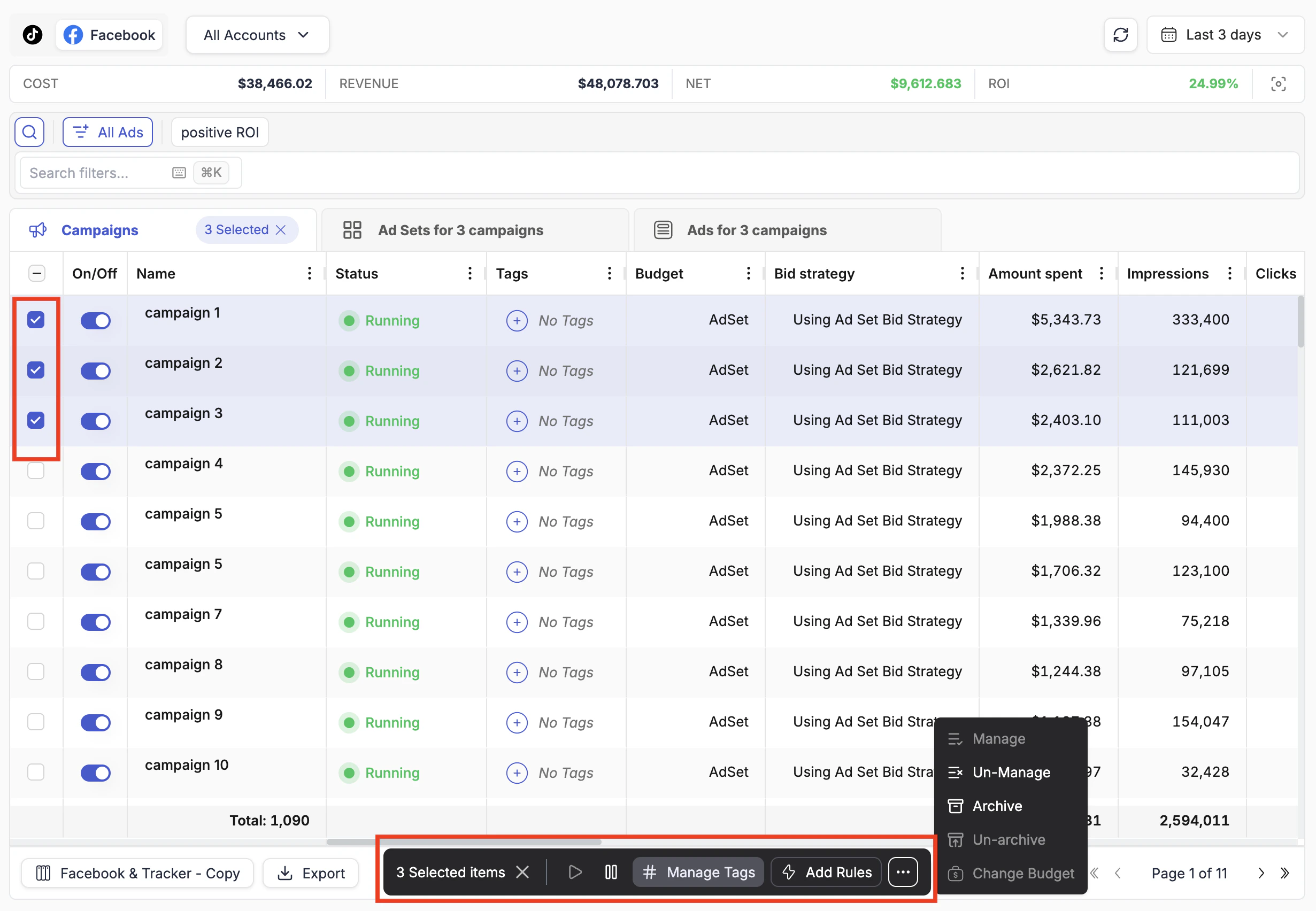
To act on multiple items at once, check the boxes at the left of each row. Once one or more items are selected, a floating action bar appears at the bottom of the page.

<Frame>
  <img src="https://mintcdn.com/theoptimizer/d8i_PgwXHcJW-VUm/images/campaign-bulk-actions.png?fit=max&auto=format&n=d8i_PgwXHcJW-VUm&q=85&s=a682c3773b3ba97e5afcae4c93915913" alt="Campaign Bulk Actions" width="2461" height="1704" data-path="images/campaign-bulk-actions.png" />
</Frame>

| Bulk action              | What it does                                                   |
| ------------------------ | -------------------------------------------------------------- |
| **Play / Pause**         | Activate or pause all selected items                           |
| **Change Budget**        | Apply a budget change to all selected items at once            |
| **Manage Tags**          | Add or remove tags on selected items                           |
| **Add Rules**            | Attach an automation rule to all selected items simultaneously |
| **Manage / Un-Manage**   | Include or exclude items from TheOptimizer's automation scope  |
| **Archive / Un-archive** | Archive campaigns you no longer want displayed                 |

<Note>
  **Archive** and **Manage / Un-Manage** are only available through the bulk action bar, not as inline row actions. These are higher-impact operations most commonly applied to multiple items at once, so they are intentionally kept out of the inline row to prevent accidental single-item changes.
</Note>
