;
};
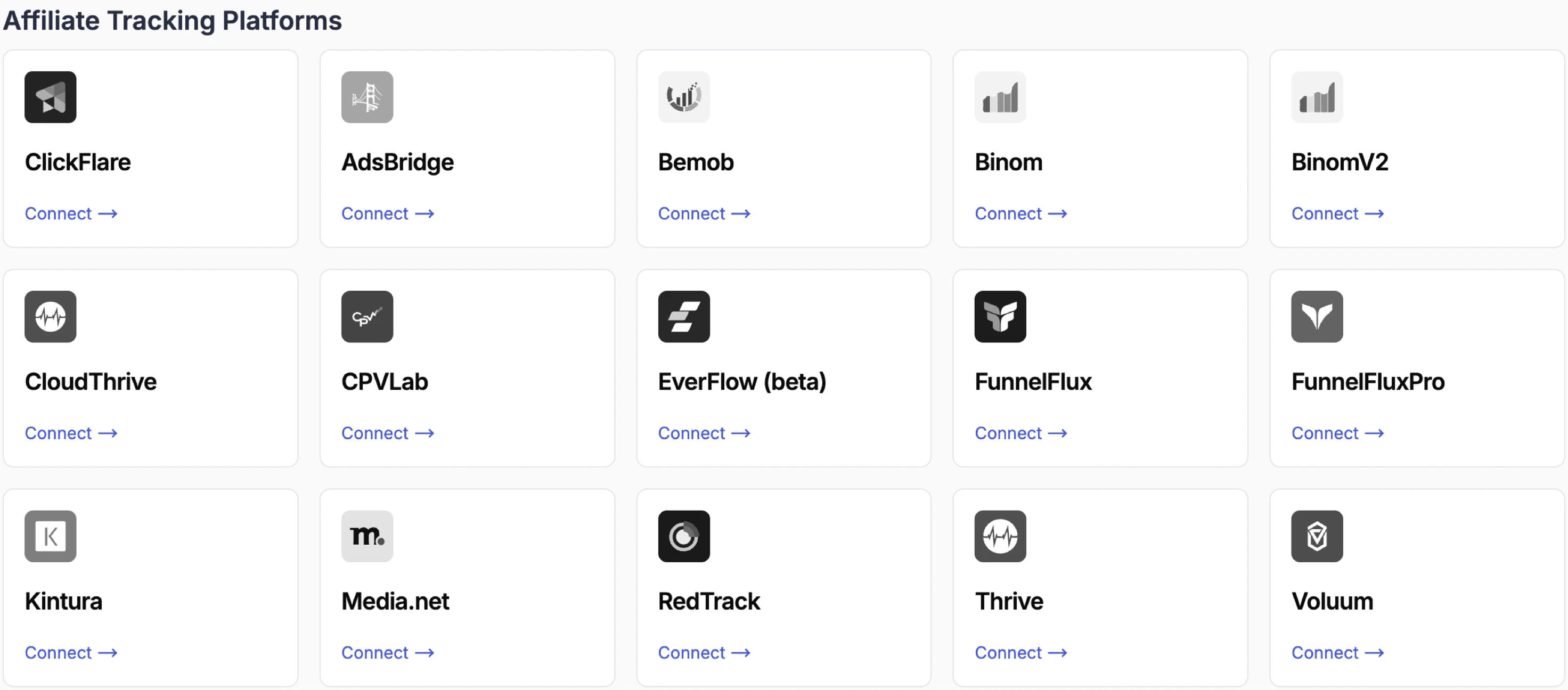
Tracking platforms sit between your ads and your landing pages, providing accurate click-level reporting and advanced funnel analytics. They overcome the attribution limitations that come with cookie restrictions on ad networks, and enable features like browser and device breakdowns, funnel management, and traffic distribution.
Supported platforms include **ClickFlare**, **Voluum**, **RedTrack**, **Bemob**, **Binom**, **Everflow**, and others.
ClickFlare is the recommended tracking platform for users who don't already have a preferred tool. It offers robust features, deep integration with TheOptimizer, and 24/7 support.
***
## How Tracker Integration Works
Once connected, TheOptimizer matches tracker-reported conversions to specific campaigns, ad sets, and ads, and factors that data into your automation rules. Tracker metrics (clicks, conversions, revenue, CPA, EPC, ROI) appear as separate columns alongside your ad network metrics.
***
## Connecting a Tracking Platform
The steps below use **ClickFlare** as the example. The process is the same for all tracking platforms that use API key authentication.
\[The example below is using ClickFlare tracker]
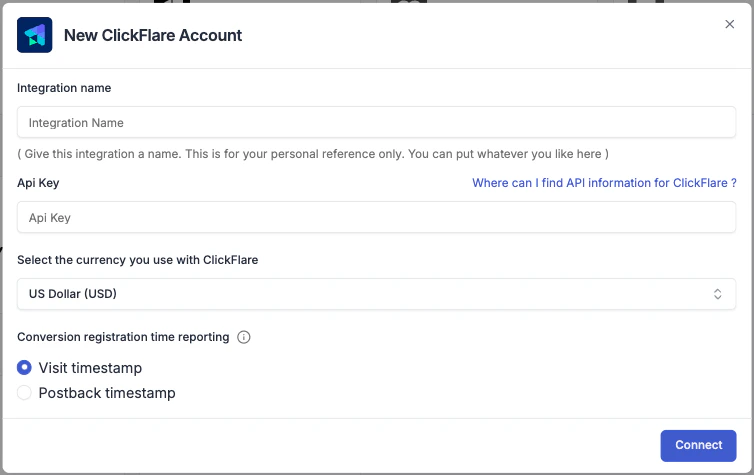
From the **Integrations** page, click **Connect →** on your tracking platform. You'll be prompted to enter:
* **Integration name** — a label for this connection. Use something descriptive like "ClickFlare – Brand A".
* **API Key** — found in your tracker's settings or API section.
* **Currency** — the currency your tracker reports revenue in.
* **Conversion registration time** — choose whether conversions are reported at **visit time** (when the user lands) or **postback time** (when the conversion fires). This affects how data is matched across time windows.
The Currency and Conversion Registration Time settings must match what you have configured on your tracking platform. Using different options here will cause data discrepancies between TheOptimizer and your tracker.
After connecting your tracking platform, TheOptimizer prompts you to configure the tracker for each ad network you are already using with TheOptimizer. This tells the platform how to match tracker data to ad network data.\
\\
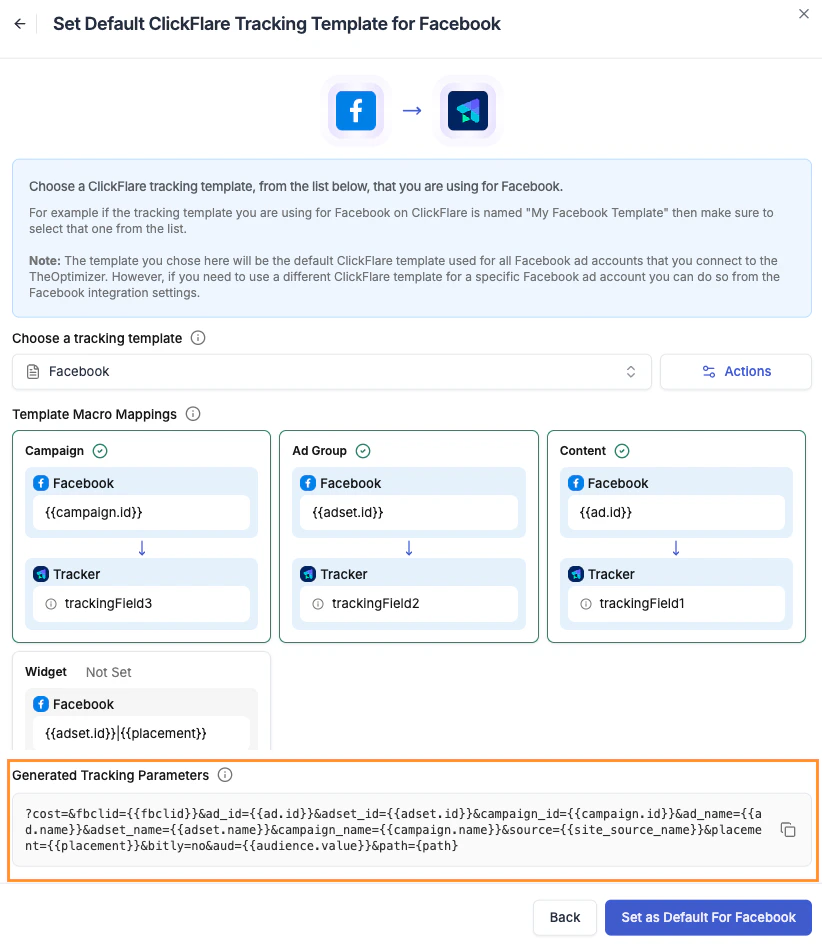
For each ad network listed, click **Connect →** and select the **tracking template** that corresponds to how you've set up your tracker for that network.
No data will be pulled from your tracking platform for ad networks that are not configured.
**Understanding tracking templates**
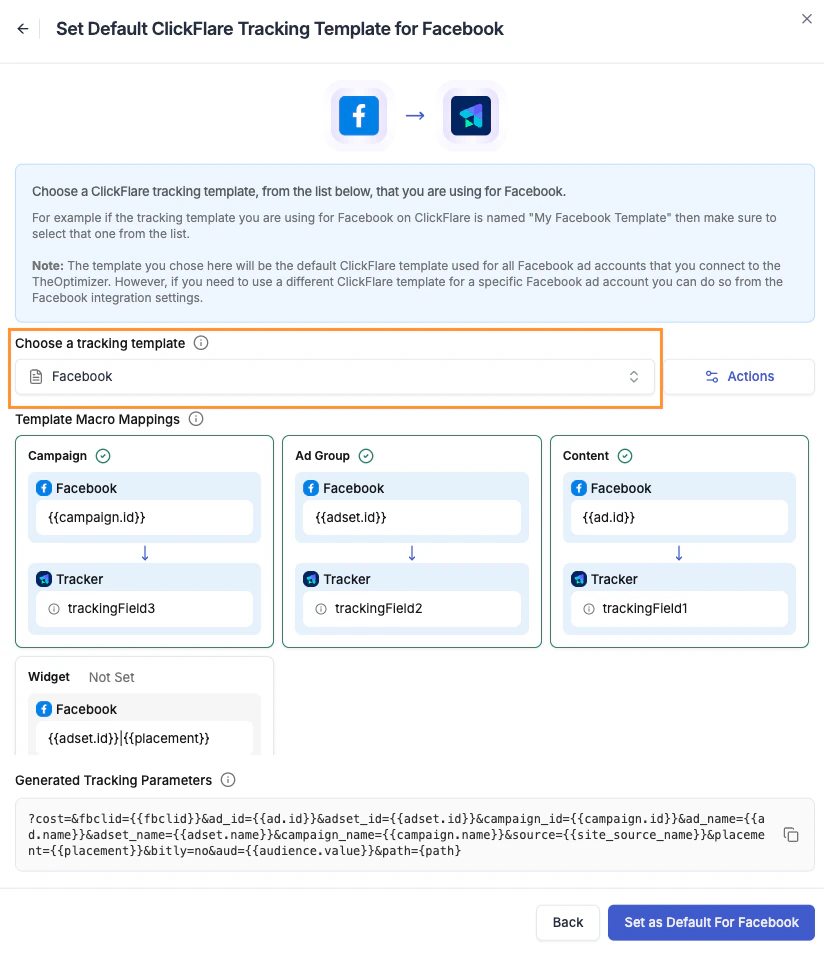
A tracking template is a set of macros that defines how your tracker reports campaign data for a specific ad network — which tracking parameter maps to the Campaign ID, Ad Set ID, Ad ID, and so on. These are typically called "Traffic Sources" on your tracking platform.
The **Choose a tracking template** dropdown shows all available tracking templates from your tracker. The template you select becomes the default for all ad accounts of that ad network.
Required macros: a template must include mappings for **Campaign ID**, **Ad Set ID**, **Ad ID**, and **Placement**. If any of these are missing, TheOptimizer will flag the issue and you'll need to fix the template in your tracker before proceeding.
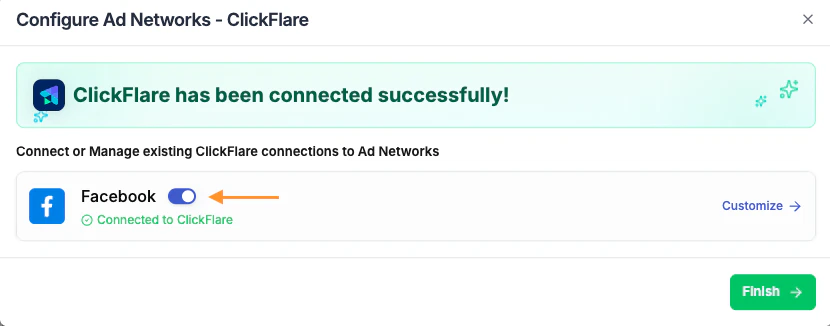
Once a tracking template is selected for an ad network, the connection status updates to **Connected.**
Turn off the connection if you want to stop receiving data from your tracker for a specific ad network without removing the integration entirely.
Make sure the generated **tracking parameters code** is added to your campaigns on the ad network. This is what enables the tracker to receive the correct campaign and ad data and report it back to TheOptimizer.
Without the tracking code added to your campaigns, the tracker will receive visits but won't be able to match them to your campaigns IDs — meaning no conversion or revenue data will flow into TheOptimizer.
***
## The One Tracker Per Campaign Rule
Only one instance of a tracker type should track any individual campaign at a time. Using two instances of the same tracker type (for example, two ClickFlare trackers) on the same campaign causes conflicts in data matching and attribution.
Running multiple **different** tracker types simultaneously on the same campaign is fine — for example, using ClickFlare for affiliate attribution alongside Google Analytics on the same campaign is a supported and common setup.
***
## Customising Tracker Connections Per Ad Account
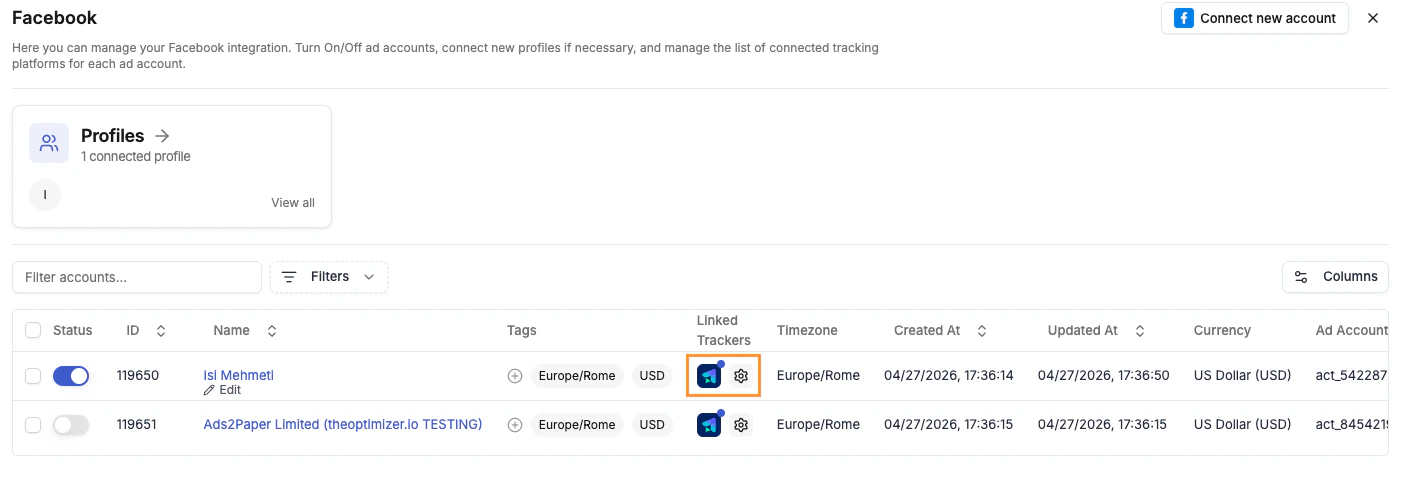
From your ad network's integration page, you can customise the tracker connection at the individual ad account level:
* **Link a different tracker** to a specific ad account
* **Pause the tracker connection** for an account without removing it
* **Edit the tracking template** for a specific account without affecting others in the same integration
This is useful when different ad accounts use different tracking setups, or when you're testing a new tracker on a subset of accounts before rolling it out fully.
 From the **Integrations** page, click **Connect →** on your tracking platform. You'll be prompted to enter:
* **Integration name** — a label for this connection. Use something descriptive like "ClickFlare – Brand A".
* **API Key** — found in your tracker's settings or API section.
* **Currency** — the currency your tracker reports revenue in.
* **Conversion registration time** — choose whether conversions are reported at **visit time** (when the user lands) or **postback time** (when the conversion fires). This affects how data is matched across time windows.
From the **Integrations** page, click **Connect →** on your tracking platform. You'll be prompted to enter:
* **Integration name** — a label for this connection. Use something descriptive like "ClickFlare – Brand A".
* **API Key** — found in your tracker's settings or API section.
* **Currency** — the currency your tracker reports revenue in.
* **Conversion registration time** — choose whether conversions are reported at **visit time** (when the user lands) or **postback time** (when the conversion fires). This affects how data is matched across time windows.
 For each ad network listed, click **Connect →** and select the **tracking template** that corresponds to how you've set up your tracker for that network.
 The **Choose a tracking template** dropdown shows all available tracking templates from your tracker. The template you select becomes the default for all ad accounts of that ad network.
 * **Link a different tracker** to a specific ad account
* **Pause the tracker connection** for an account without removing it
* **Edit the tracking template** for a specific account without affecting others in the same integration
This is useful when different ad accounts use different tracking setups, or when you're testing a new tracker on a subset of accounts before rolling it out fully.
* **Link a different tracker** to a specific ad account
* **Pause the tracker connection** for an account without removing it
* **Edit the tracking template** for a specific account without affecting others in the same integration
This is useful when different ad accounts use different tracking setups, or when you're testing a new tracker on a subset of accounts before rolling it out fully.