> ## Documentation Index
> Fetch the complete documentation index at: https://docs.theoptimizer.io/llms.txt
> Use this file to discover all available pages before exploring further.
# Bulk Upload Campaigns via Excel
> Upload multiple MGID campaigns at once using a pre-built Google Sheets template, then submit the exported Excel file through TheOptimizer's Campaign Creator.
export const ArcadePopoutModal = ({id, title = "Interactive demo"}) => {
const [isPopout, setIsPopout] = useState(false);
const iframeRef = useRef(null);
useEffect(() => {
function onArcadeIframeMessage(e) {
if (e.origin !== 'https://demo.arcade.software' || !e.isTrusted) return;
if (!iframeRef.current || !iframeRef.current.contentWindow) return;
if (e.data.event === 'arcade-init') {
iframeRef.current.contentWindow.postMessage({
event: 'register-popout-handler'
}, '*');
}
if (e.data.event === 'arcade-popout-open') {
setIsPopout(true);
}
if (e.data.event === 'arcade-popout-close') {
setIsPopout(false);
}
}
window.addEventListener('message', onArcadeIframeMessage);
return () => window.removeEventListener('message', onArcadeIframeMessage);
}, []);
return
;
};
The MGID Excel Uploader lets you prepare and launch multiple campaigns at once without going through the UI one by one. You define everything — targeting, budget, bidding, and creatives — in an Excel file and submit it through TheOptimizer. You can start from a blank Google Sheets template, or download a pre-filled Excel directly from any existing campaign — ideal when you're launching variations of setups you already run.
***
## How It Works
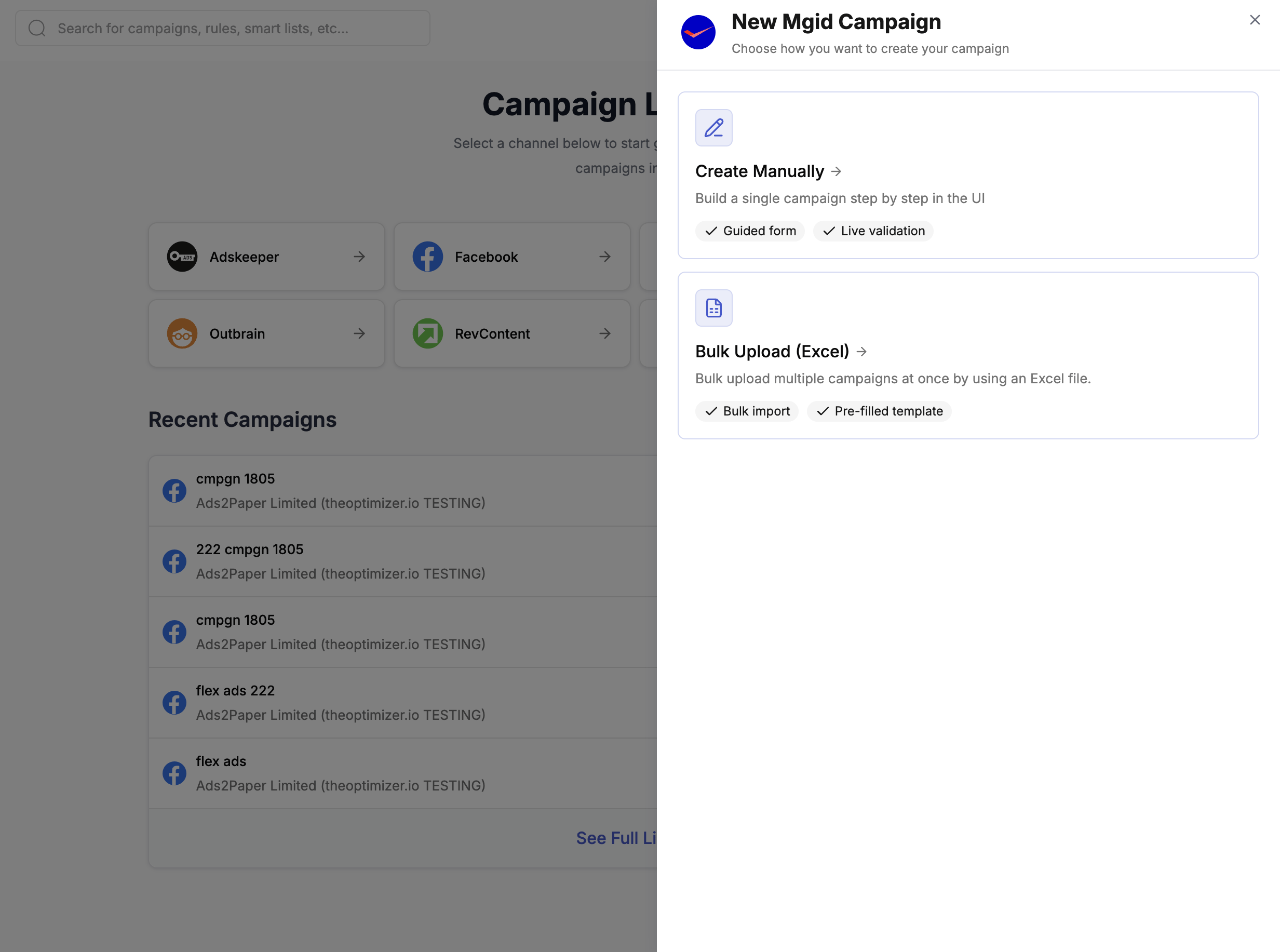
Open [**Campaign Creator**](https://native.theoptimizer.io/#/campaign-creator-queue) in TheOptimizer and click the **MGID** card. Choose **Bulk Upload (Excel)** from the options shown.
 You then have two ways to get your template:
**Option A — Download pre-filled from an existing campaign (recommended)**
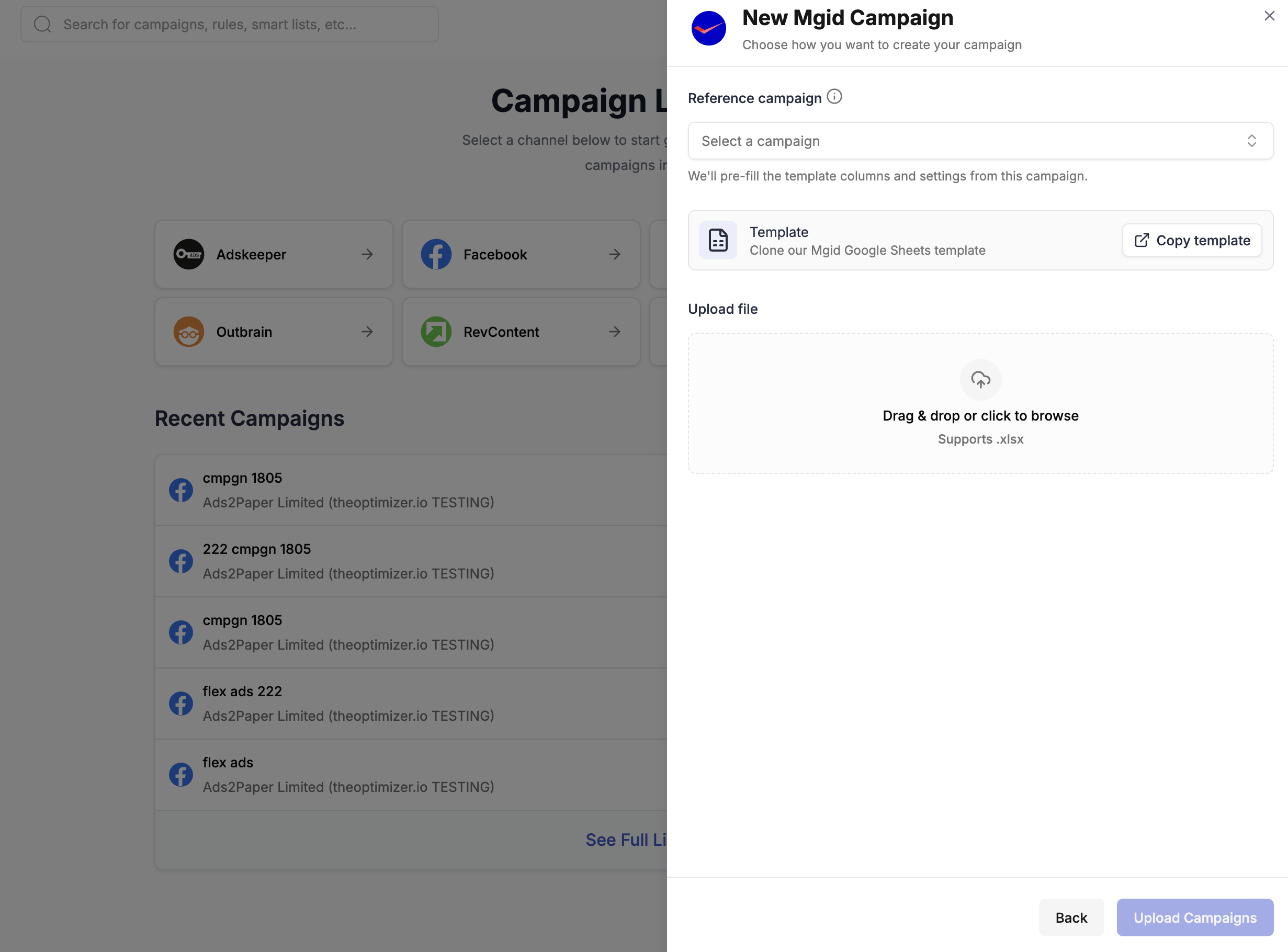
In the **Reference campaign** dropdown, select an existing campaign. TheOptimizer will pre-fill the template columns and settings from that campaign. Download the pre-filled Excel file and use it as your base — duplicate rows, update creatives and headlines, and adjust settings as needed.
You then have two ways to get your template:
**Option A — Download pre-filled from an existing campaign (recommended)**
In the **Reference campaign** dropdown, select an existing campaign. TheOptimizer will pre-fill the template columns and settings from that campaign. Download the pre-filled Excel file and use it as your base — duplicate rows, update creatives and headlines, and adjust settings as needed.
 This is the fastest approach when you're launching campaigns similar to setups you already run.
**Option B — Start from the empty Google Sheets template**
If you're setting up a new campaign type from scratch, click **Copy template** to clone the empty template into your Google account:
[**Clone the MGID Google Sheets Template →**](https://docs.google.com/spreadsheets/d/1FU0IIrWXHpjt6VBZgtzZT4MVBcN7mXJQTMWc7SPd5ZU/copy)
The template contains:
* A **main sheet** with one row per ad (campaign settings + creative in each row)
* **Auxiliary sheets** with reference data: Languages, Countries, Regions, Operating Systems, and more
* **Column notes** on every column header — hover over the column name to see the accepted values and format
Each row in the main sheet represents one ad. To create a campaign with multiple ads, add one row per ad keeping all campaign-level columns identical, and vary only the ad-level columns (image URL, headline, etc.).
**Key things to note:**
* Columns marked 🚩 **REQUIRED** must be filled in — the upload will fail if they're missing
* Columns marked 🟡 are conditionally required (e.g. Countries is only needed if Geo Targeting is set to INCLUDE or EXCLUDE)
* Use the auxiliary sheets to look up valid values for countries, regions, languages, operating systems, etc.
If you used **Option B** (Google Sheets template), first export your sheet: in Google Sheets, go to **File → Download → Microsoft Excel (.xlsx)**.
Back in the modal, drag and drop your **.xlsx file** into the upload area or click to browse for it. Then click **Upload Campaigns** to submit.
After submitting, TheOptimizer processes the file and sends you an email:
* ✅ **Successful upload** — your campaigns are queued and being created on MGID. Track progress from the [Campaign Creator](https://native.theoptimizer.io/#/campaign-creator-queue) page.
* ⚠️ **Upload failed** — the email will include a new Excel file with all error cells highlighted. Download it, fix the issues, and re-upload.
***
## Column Reference
The table below describes every column in the MGID Excel template.
| Column | Description |
| ----------------------------- | -------------------------------------------------------------------------------------------------------------------------------------------------------------------- |
| **Traffic Source Account ID** | 🚩 REQUIRED. The MGID account ID from TheOptimizer where campaigns will be uploaded. |
| **Campaign Name** | 🚩 REQUIRED. The name of the campaign. Must be unique within your account. |
| **Campaign Type** | 🚩 REQUIRED. Double-click the cell to select a campaign type from the list. |
| **Campaign Category** | 🚩 REQUIRED. Type of website being promoted. `Product promotions` for products/services. `Content promotions` for article-based sites. |
| **Campaign Keyword** | Required only if Campaign Type is `SEARCH_FEED`. |
| **Campaign Language** | 🚩 REQUIRED. Language for the campaign creatives. Creatives in other languages will be rejected. See Languages sheet. |
| **Start Date** | Campaign start date. If not specified, the campaign starts once approved. Format: `2023-10-10 19:00:00`. |
| **Geo Targeting** | 🚩 REQUIRED. `ALL`, `INCLUDE`, or `EXCLUDE`. |
| **Countries** | 🟡 Required if Geo Targeting is INCLUDE or EXCLUDE. Comma-separated country codes (e.g. `US, IT`). See Countries sheet. |
| **Regions** | Specific regions within targeted countries. Comma-separated. See Regions sheet. |
| **Browser Targeting** | 🚩 REQUIRED. `ALL`, `INCLUDE`, or `EXCLUDE`. |
| **Browsers** | 🟡 Required if Browser Targeting is INCLUDE or EXCLUDE. Comma-separated list of browsers. |
| **OS Targeting** | `ALL`, `INCLUDE`, or `EXCLUDE`. |
| **OS** | 🟡 Required if OS Targeting is INCLUDE or EXCLUDE. Comma-separated OS names. See Operating Systems sheet. |
| **Limit Type** | 🚩 REQUIRED. `BUDGET_LIMIT` — campaign runs until budget is spent. `CLICK_LIMIT` — campaign runs until click count is reached. |
| **Daily Limit** | Daily spend or click limit. Minimum \$50 for BUDGET\_LIMIT; minimum 500 for CLICK\_LIMIT. |
| **Overall Limit** | Total campaign limit. Must be greater than Daily Limit. |
| **Split Budget** | Splits budget evenly throughout the day. Only for `CLICK_LIMIT`. Values: `0` (off) or `1` (on). |
| **UTM Source** | Value passed via `utm_source` for Google Analytics tracking. |
| **UTM Medium** | Value passed via `utm_medium` for Google Analytics tracking. |
| **UTM Campaign** | Value passed via `utm_campaign` for Google Analytics tracking. |
| **UTM Custom** | Custom tracking code appended to content URLs for third-party trackers. |
| **Target URL** | 🚩 REQUIRED (unless using Media Manager Ads). Landing page URL for the teaser. |
| **Image URL** | 🚩 REQUIRED (unless using Media Manager Ads). Ad image URL. |
| **Headline** | 🚩 REQUIRED (unless using Media Manager Ads). Ad headline. For content/product campaigns: up to 75 characters. |
| **Cost Per Click** | 🚩 REQUIRED. CPC in US cents. Example: `20` means \$0.20. |
| **Advert Text** | Ad description text. For content/product: up to 75 characters (optional). For push: up to 40 characters (required). |
| **Content Category** | Available for Content, Push, and Product campaign types. |
| **Media Manager Ads** | Reference a saved Ad group from MGID's Media Manager instead of providing individual image/headline/URL fields. |
| **Rules** | Comma-separated Rule IDs from TheOptimizer to attach to the campaign after creation. |
| **Rule Groups** | Comma-separated rule group names from TheOptimizer to attach after creation. |
This is the fastest approach when you're launching campaigns similar to setups you already run.
**Option B — Start from the empty Google Sheets template**
If you're setting up a new campaign type from scratch, click **Copy template** to clone the empty template into your Google account:
[**Clone the MGID Google Sheets Template →**](https://docs.google.com/spreadsheets/d/1FU0IIrWXHpjt6VBZgtzZT4MVBcN7mXJQTMWc7SPd5ZU/copy)
The template contains:
* A **main sheet** with one row per ad (campaign settings + creative in each row)
* **Auxiliary sheets** with reference data: Languages, Countries, Regions, Operating Systems, and more
* **Column notes** on every column header — hover over the column name to see the accepted values and format
Each row in the main sheet represents one ad. To create a campaign with multiple ads, add one row per ad keeping all campaign-level columns identical, and vary only the ad-level columns (image URL, headline, etc.).
**Key things to note:**
* Columns marked 🚩 **REQUIRED** must be filled in — the upload will fail if they're missing
* Columns marked 🟡 are conditionally required (e.g. Countries is only needed if Geo Targeting is set to INCLUDE or EXCLUDE)
* Use the auxiliary sheets to look up valid values for countries, regions, languages, operating systems, etc.
If you used **Option B** (Google Sheets template), first export your sheet: in Google Sheets, go to **File → Download → Microsoft Excel (.xlsx)**.
Back in the modal, drag and drop your **.xlsx file** into the upload area or click to browse for it. Then click **Upload Campaigns** to submit.
After submitting, TheOptimizer processes the file and sends you an email:
* ✅ **Successful upload** — your campaigns are queued and being created on MGID. Track progress from the [Campaign Creator](https://native.theoptimizer.io/#/campaign-creator-queue) page.
* ⚠️ **Upload failed** — the email will include a new Excel file with all error cells highlighted. Download it, fix the issues, and re-upload.
***
## Column Reference
The table below describes every column in the MGID Excel template.
| Column | Description |
| ----------------------------- | -------------------------------------------------------------------------------------------------------------------------------------------------------------------- |
| **Traffic Source Account ID** | 🚩 REQUIRED. The MGID account ID from TheOptimizer where campaigns will be uploaded. |
| **Campaign Name** | 🚩 REQUIRED. The name of the campaign. Must be unique within your account. |
| **Campaign Type** | 🚩 REQUIRED. Double-click the cell to select a campaign type from the list. |
| **Campaign Category** | 🚩 REQUIRED. Type of website being promoted. `Product promotions` for products/services. `Content promotions` for article-based sites. |
| **Campaign Keyword** | Required only if Campaign Type is `SEARCH_FEED`. |
| **Campaign Language** | 🚩 REQUIRED. Language for the campaign creatives. Creatives in other languages will be rejected. See Languages sheet. |
| **Start Date** | Campaign start date. If not specified, the campaign starts once approved. Format: `2023-10-10 19:00:00`. |
| **Geo Targeting** | 🚩 REQUIRED. `ALL`, `INCLUDE`, or `EXCLUDE`. |
| **Countries** | 🟡 Required if Geo Targeting is INCLUDE or EXCLUDE. Comma-separated country codes (e.g. `US, IT`). See Countries sheet. |
| **Regions** | Specific regions within targeted countries. Comma-separated. See Regions sheet. |
| **Browser Targeting** | 🚩 REQUIRED. `ALL`, `INCLUDE`, or `EXCLUDE`. |
| **Browsers** | 🟡 Required if Browser Targeting is INCLUDE or EXCLUDE. Comma-separated list of browsers. |
| **OS Targeting** | `ALL`, `INCLUDE`, or `EXCLUDE`. |
| **OS** | 🟡 Required if OS Targeting is INCLUDE or EXCLUDE. Comma-separated OS names. See Operating Systems sheet. |
| **Limit Type** | 🚩 REQUIRED. `BUDGET_LIMIT` — campaign runs until budget is spent. `CLICK_LIMIT` — campaign runs until click count is reached. |
| **Daily Limit** | Daily spend or click limit. Minimum \$50 for BUDGET\_LIMIT; minimum 500 for CLICK\_LIMIT. |
| **Overall Limit** | Total campaign limit. Must be greater than Daily Limit. |
| **Split Budget** | Splits budget evenly throughout the day. Only for `CLICK_LIMIT`. Values: `0` (off) or `1` (on). |
| **UTM Source** | Value passed via `utm_source` for Google Analytics tracking. |
| **UTM Medium** | Value passed via `utm_medium` for Google Analytics tracking. |
| **UTM Campaign** | Value passed via `utm_campaign` for Google Analytics tracking. |
| **UTM Custom** | Custom tracking code appended to content URLs for third-party trackers. |
| **Target URL** | 🚩 REQUIRED (unless using Media Manager Ads). Landing page URL for the teaser. |
| **Image URL** | 🚩 REQUIRED (unless using Media Manager Ads). Ad image URL. |
| **Headline** | 🚩 REQUIRED (unless using Media Manager Ads). Ad headline. For content/product campaigns: up to 75 characters. |
| **Cost Per Click** | 🚩 REQUIRED. CPC in US cents. Example: `20` means \$0.20. |
| **Advert Text** | Ad description text. For content/product: up to 75 characters (optional). For push: up to 40 characters (required). |
| **Content Category** | Available for Content, Push, and Product campaign types. |
| **Media Manager Ads** | Reference a saved Ad group from MGID's Media Manager instead of providing individual image/headline/URL fields. |
| **Rules** | Comma-separated Rule IDs from TheOptimizer to attach to the campaign after creation. |
| **Rule Groups** | Comma-separated rule group names from TheOptimizer to attach after creation. |