> ## Documentation Index
> Fetch the complete documentation index at: https://docs.theoptimizer.io/llms.txt
> Use this file to discover all available pages before exploring further.
# Bulk Upload Campaigns via Excel
> Launch multiple NewsBreak campaigns at once using an Excel file prepared from an existing campaign or the provided template, then submit it through TheOptimizer's Campaign Creator.
The NewsBreak Excel Uploader lets you prepare and launch multiple campaigns at once without going through the UI one by one. You define everything — targeting, budget, bidding, and creatives — in an Excel file and submit it through TheOptimizer. You can start from a blank template, or download a pre-filled Excel directly from any existing NewsBreak campaign — ideal when you're launching variations of setups you already run.
***
## How It Works
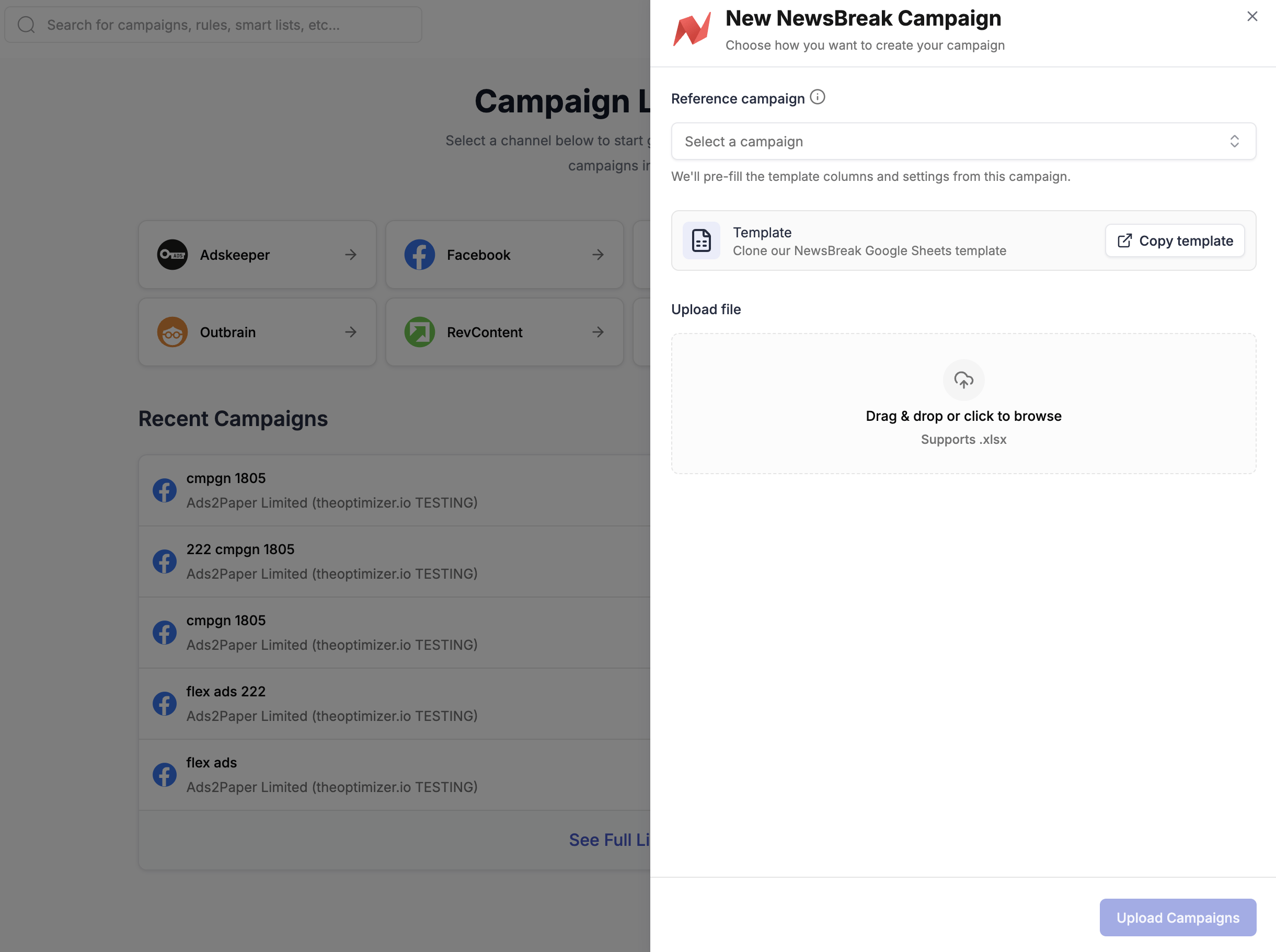
Open [**Campaign Creator**](https://native.theoptimizer.io/#/campaign-creator-queue) in TheOptimizer and click the **NewsBreak** card. The bulk upload modal opens directly.
You have two ways to get your template:
**Option A — Download pre-filled from an existing campaign (recommended)**
In the **Reference campaign** dropdown, select an existing campaign. TheOptimizer will pre-fill the template columns and settings from that campaign. Download the pre-filled Excel file and use it as your base — duplicate rows, update creatives and headlines, and adjust settings as needed.
This is the fastest approach when you're launching campaigns similar to setups you already run.
**Option B — Start from the empty template**
If you're setting up a new campaign type from scratch, click **Copy template** to clone the empty NewsBreak template into your Google account. Fill in your campaign settings from scratch using the column notes as a guide.
Each row in the main sheet represents one ad. To create a campaign with multiple ads, add one row per ad — keep all campaign-level columns identical and vary only the ad-level columns (image URL, headline, etc.).
**Key things to note:**
* Columns marked 🚩 **REQUIRED** must be filled in — the upload will fail if they're missing
* Columns marked 🟡 are conditionally required (e.g. Countries is only needed if Geo Targeting is set to INCLUDE or EXCLUDE)
* Hover over any column header to see the accepted values and format
If you started from a reference campaign (Option A), most columns are already filled in. You typically only need to update the ad-level columns (image URL, headline, target URL) and duplicate rows for additional campaigns.
If you used **Option B** (Google Sheets template), first export your sheet: in Google Sheets, go to **File → Download → Microsoft Excel (.xlsx)**.
Back in the modal, drag and drop your **.xlsx file** into the upload area or click to browse for it. Then click **Upload Campaigns** to submit.
After submitting, TheOptimizer processes the file and sends you an email:
* ✅ **Successful upload** — your campaigns are queued and being created on NewsBreak. Track progress from the [Campaign Creator](https://native.theoptimizer.io/#/campaign-creator-queue) page.
* ⚠️ **Upload failed** — the email will include a new Excel file with all error cells highlighted. Download it, fix the issues, and re-upload.
***
## Column Reference
The table below describes the key columns in the NewsBreak Excel template. Hover over any column header in the template for the full accepted values and format notes.
| Column | Description |
| ----------------------------- | -------------------------------------------------------------------------------------------------------------------------------------------------------------------- |
| **Traffic Source Account ID** | 🚩 REQUIRED. The NewsBreak account ID from TheOptimizer where campaigns will be uploaded. Find it under Traffic Sources in the left menu. |
| **Campaign Name** | 🚩 REQUIRED. The name of the campaign. |
| **Campaign Status** | 🚩 REQUIRED. `ACTIVE` — starts running once approved. `PAUSED` — created paused; you start it manually. |
| **Start Date** | Campaign start date. Leave empty to start immediately. |
| **End Date** | Campaign end date. Leave empty to run until budget is depleted. |
| **Country Targeting** | 🚩 REQUIRED. `ALL`, `INCLUDE`, or `EXCLUDE`. |
| **Countries** | 🟡 Required if Country Targeting is INCLUDE or EXCLUDE. Comma-separated country codes (e.g. `US, CA`). |
| **Device Targeting** | 🚩 REQUIRED. Target platforms. Values: `DESKTOP`, `MOBILE`, `TABLET`. Comma-separated for multiple. |
| **OS Targeting** | OS to target. Comma-separated OS names. |
| **Budget Type** | 🚩 REQUIRED. `DAILY` or `TOTAL`. |
| **Budget** | 🚩 REQUIRED. Daily or total campaign budget. |
| **Bid** | 🚩 REQUIRED. Cost per click. |
| **Tracking Code** | URL parameters appended to landing page URLs for external tracking. |
| **Target URL** | 🚩 REQUIRED. Landing page URL for the ad. |
| **Image URL** | 🚩 REQUIRED. Ad image URL. |
| **Headline** | 🚩 REQUIRED. Ad headline text. |
| **Rules** | Comma-separated Rule IDs from TheOptimizer to attach to the campaign after creation. |
| **Rule Groups** | Comma-separated rule group names from TheOptimizer to attach after creation. |
 You have two ways to get your template:
**Option A — Download pre-filled from an existing campaign (recommended)**
In the **Reference campaign** dropdown, select an existing campaign. TheOptimizer will pre-fill the template columns and settings from that campaign. Download the pre-filled Excel file and use it as your base — duplicate rows, update creatives and headlines, and adjust settings as needed.
This is the fastest approach when you're launching campaigns similar to setups you already run.
**Option B — Start from the empty template**
If you're setting up a new campaign type from scratch, click **Copy template** to clone the empty NewsBreak template into your Google account. Fill in your campaign settings from scratch using the column notes as a guide.
You have two ways to get your template:
**Option A — Download pre-filled from an existing campaign (recommended)**
In the **Reference campaign** dropdown, select an existing campaign. TheOptimizer will pre-fill the template columns and settings from that campaign. Download the pre-filled Excel file and use it as your base — duplicate rows, update creatives and headlines, and adjust settings as needed.
This is the fastest approach when you're launching campaigns similar to setups you already run.
**Option B — Start from the empty template**
If you're setting up a new campaign type from scratch, click **Copy template** to clone the empty NewsBreak template into your Google account. Fill in your campaign settings from scratch using the column notes as a guide.