> ## Documentation Index
> Fetch the complete documentation index at: https://docs.theoptimizer.io/llms.txt
> Use this file to discover all available pages before exploring further.
# Bulk Upload Campaigns via Excel
> Upload multiple Taboola campaigns at once using a pre-built Google Sheets template, then submit the exported Excel file through TheOptimizer's Campaign Creator.
export const ArcadePopoutModal = ({id, title = "Interactive demo"}) => {
const [isPopout, setIsPopout] = useState(false);
const iframeRef = useRef(null);
useEffect(() => {
function onArcadeIframeMessage(e) {
if (e.origin !== 'https://demo.arcade.software' || !e.isTrusted) return;
if (!iframeRef.current || !iframeRef.current.contentWindow) return;
if (e.data.event === 'arcade-init') {
iframeRef.current.contentWindow.postMessage({
event: 'register-popout-handler'
}, '*');
}
if (e.data.event === 'arcade-popout-open') {
setIsPopout(true);
}
if (e.data.event === 'arcade-popout-close') {
setIsPopout(false);
}
}
window.addEventListener('message', onArcadeIframeMessage);
return () => window.removeEventListener('message', onArcadeIframeMessage);
}, []);
return
;
};
The Taboola Excel Uploader lets you prepare and launch multiple campaigns at once without going through the UI one by one. You define everything — targeting, budget, bidding, and creatives — in an Excel file and submit it through TheOptimizer. You can start from a blank Google Sheets template, or download a pre-filled Excel directly from any existing campaign — ideal when you're launching variations of setups you already run.
***
## How It Works
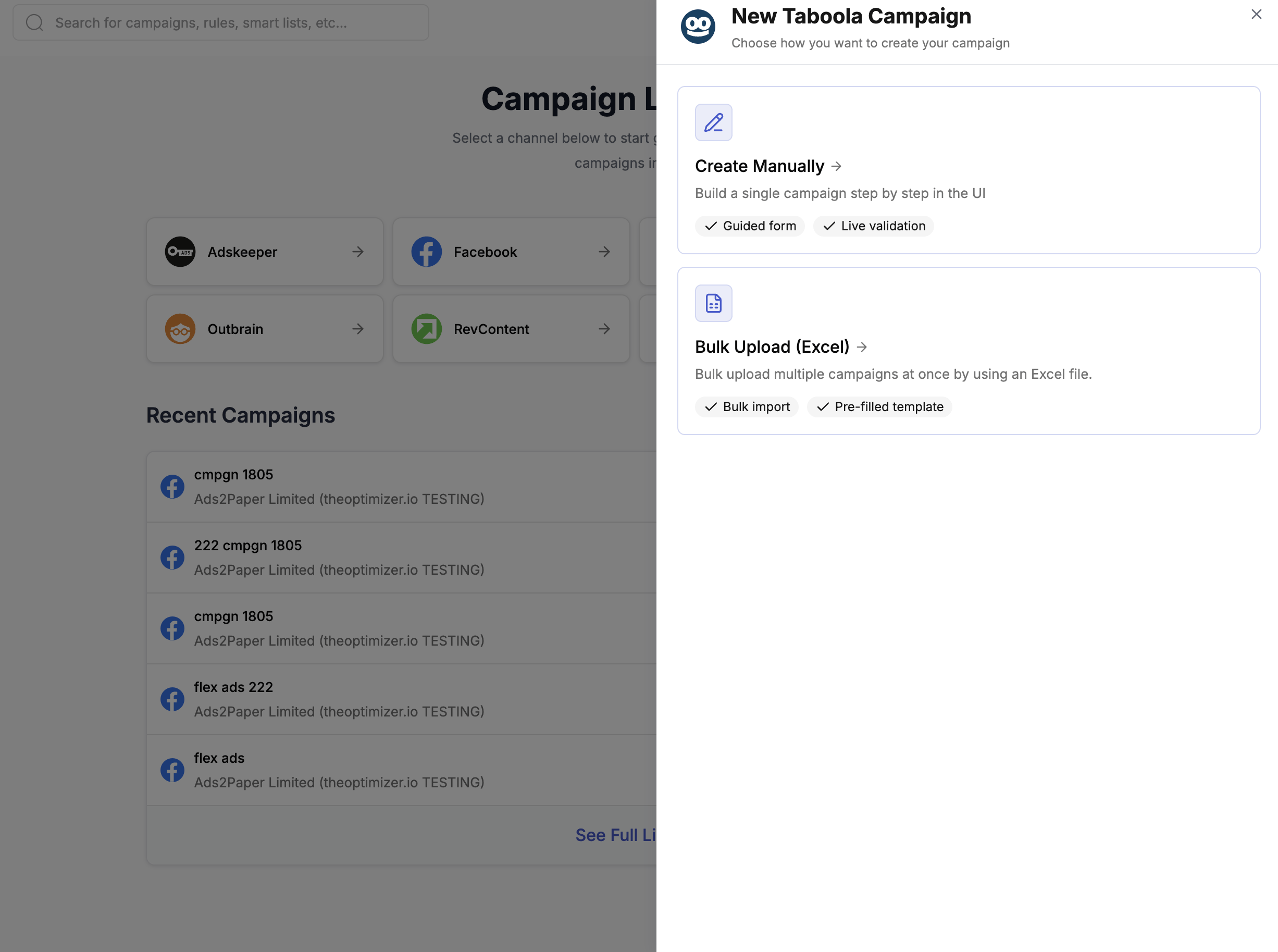
Open [**Campaign Creator**](https://native.theoptimizer.io/#/campaign-creator-queue) in TheOptimizer and click the **Taboola** card. Choose **Bulk Upload (Excel)** from the options shown.
 You then have two ways to get your template:
**Option A — Download pre-filled from an existing campaign (recommended)**
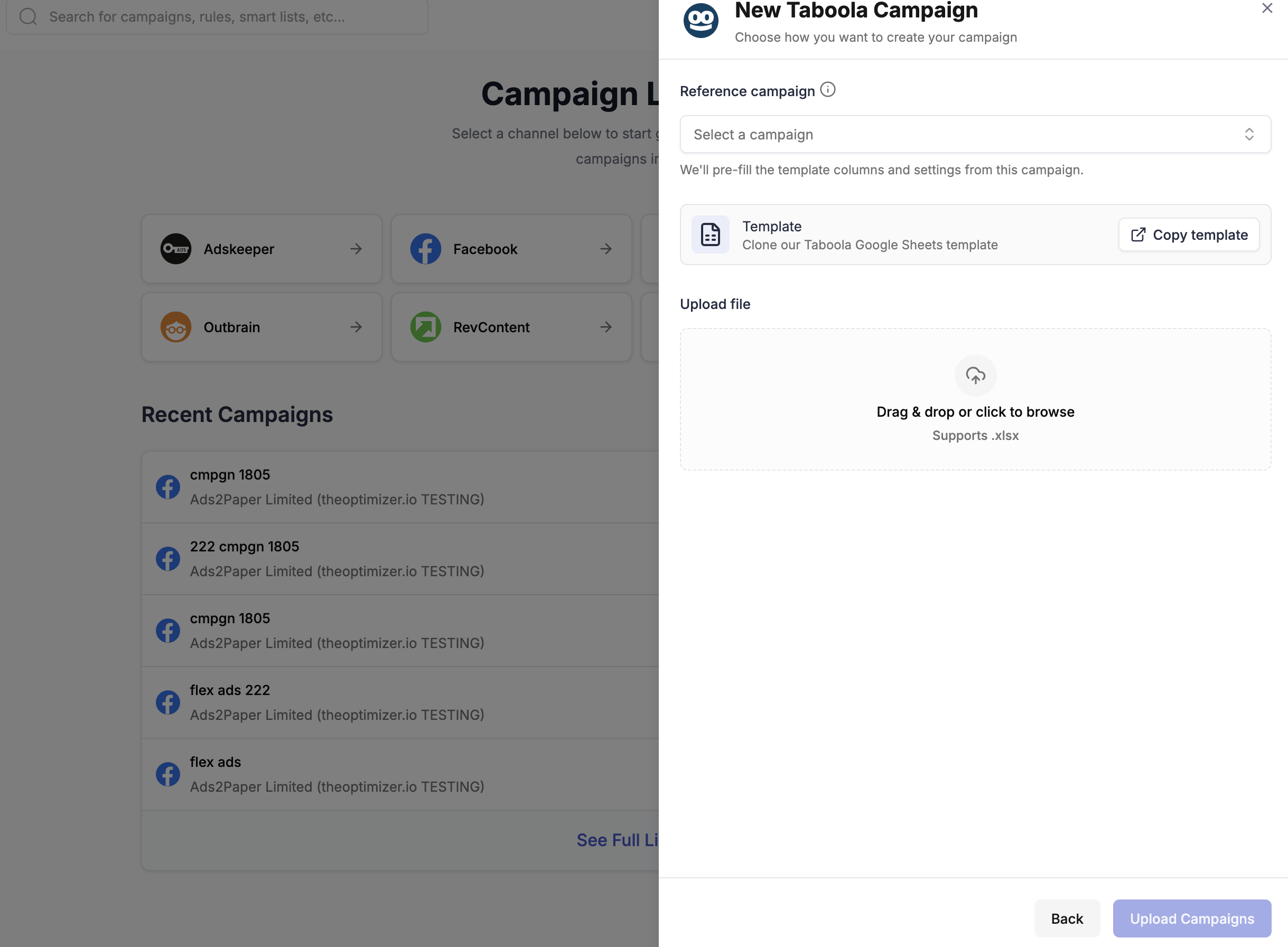
In the **Reference campaign** dropdown, select an existing campaign. TheOptimizer will pre-fill the template columns and settings from that campaign. Download the pre-filled Excel file and use it as your base — duplicate rows, update creatives and headlines, and adjust settings as needed.
You then have two ways to get your template:
**Option A — Download pre-filled from an existing campaign (recommended)**
In the **Reference campaign** dropdown, select an existing campaign. TheOptimizer will pre-fill the template columns and settings from that campaign. Download the pre-filled Excel file and use it as your base — duplicate rows, update creatives and headlines, and adjust settings as needed.
 This is the fastest approach when you're launching campaigns similar to setups you already run.
**Option B — Start from the empty Google Sheets template**
If you're setting up a new campaign type from scratch, click **Copy template** to clone the empty template into your Google account:
[**Clone the Taboola Google Sheets Template →**](https://docs.google.com/spreadsheets/d/14Z3lSobmqQxY83I-XK6foWtLTxy3qGP7_2yrIsBBAAw/copy)
The template contains:
* A **main sheet** with one row per ad (campaign settings + creative in each row)
* **Auxiliary sheets** with reference data: Countries, Regions, Browsers, OS Versions, Timezones, and more
* **Column notes** on every column header — hover over the column name to see the accepted values and format
Each row in the main sheet represents one ad. To create a campaign with multiple ads, add one row per ad keeping all campaign-level columns identical, and vary only the ad-level columns (image URL, headline, CTA, etc.).
**Key things to note:**
* Columns marked 🚩 **REQUIRED** must be filled in — the upload will fail if they're missing
* Columns marked 🟡 are conditionally required (e.g. Countries is only needed if Country Targeting is set to INCLUDE or EXCLUDE)
* Use the auxiliary sheets to look up valid values for countries, regions, browsers, OS versions, etc.
If you used **Option B** (Google Sheets template), first export your sheet: in Google Sheets, go to **File → Download → Microsoft Excel (.xlsx)**.
Back in the modal, drag and drop your **.xlsx file** into the upload area or click to browse for it. Then click **Upload Campaigns** to submit.
After submitting, TheOptimizer processes the file and sends you an email:
* ✅ **Successful upload** — your campaigns are queued and being created on Taboola. Track progress from the [Campaign Creator](https://native.theoptimizer.io/#/campaign-creator-queue) page.
* ⚠️ **Upload failed** — the email will include a new Excel file with all error cells highlighted. Download it, fix the issues, and re-upload.
***
## Column Reference
The table below describes every column in the Taboola Excel template.
| Column | Description |
| --------------------------------------- | -------------------------------------------------------------------------------------------------------------------------------------------------------------------- |
| **Traffic Source Account ID** | 🚩 REQUIRED. The Taboola account ID from TheOptimizer where campaigns will be uploaded. Find it under Traffic Sources in the left menu. |
| **Campaign Name** | 🚩 REQUIRED. The name of the campaign. |
| **Marketing Objective** | 🚩 REQUIRED. Taboola optimization goal. Values: `LEADS_GENERATION`, `ONLINE_PURCHASES`, `DRIVE_WEBSITE_TRAFFIC`, `BRAND_AWARENESS`. |
| **Brand Name** | REQUIRED. Your brand or website name (no "www" or "http"). Appears below the ad title. |
| **Start Date** | Leave empty to start immediately, or specify a date. |
| **End Date** | Leave empty to run until budget depleted, or specify an end date. |
| **Campaign Status** | 🚩 REQUIRED. `ACTIVE` — starts running once approved. `PAUSED` — created paused; you start it manually. |
| **Campaign Schedule Days** | Days the campaign runs. Leave empty for 24/7. Example: `Monday, Tuesday, Wednesday, Thursday, Friday`. |
| **Campaign Schedule Start Hour** | Start hour per scheduled day (e.g. `11, 8, 23` for Mon/Tue/Thu). |
| **Campaign Schedule End Hour** | End hour per scheduled day. |
| **Campaign Schedule Timezone** | Timezone for scheduling. Defaults to your Taboola account timezone. |
| **Country Targeting** | `ALL`, `INCLUDE`, or `EXCLUDE`. |
| **Countries** | 🟡 Required if Country Targeting is INCLUDE or EXCLUDE. Comma-separated country names. See Countries sheet. |
| **Regions** | Comma-separated regions to target (only available when Country Targeting is INCLUDE). See Regions sheet. |
| **Platforms Targeting** | 🚩 REQUIRED. `ALL`, `INCLUDE`, or `EXCLUDE`. |
| **Platforms** | 🟡 Required if Platforms Targeting is INCLUDE or EXCLUDE. Values: `PHON`, `DESK`, `TBLT`. |
| **Operating System Targeting** | 🚩 REQUIRED. `ALL`, `INCLUDE`, or `EXCLUDE`. |
| **Operating Systems** | 🟡 Required if OS Targeting is INCLUDE or EXCLUDE. Values: `Mac OS X`, `Linux`, `Windows`, `iOS`, `Android`. |
| **Operating System Versions** | Narrow OS targeting by specific versions. See OS Versions sheet. |
| **Browsers Targeting** | 🚩 REQUIRED. `ALL`, `INCLUDE`, or `EXCLUDE`. |
| **Browsers** | 🟡 Required if Browser Targeting is INCLUDE or EXCLUDE. See Browsers sheet. |
| **Connection Type** | 🚩 REQUIRED. `ALL` or `WIFI`. |
| **Block Sites** | Comma-separated list of sites to block at campaign level. |
| **Brand Safety Type** | 🚩 REQUIRED. Brand safety partner setting (DoubleVerify / IAS). |
| **Brand Safety Segments** | List of brand safety segments where ads should not appear. |
| **Brand Safety Risk Level** | Risk level tolerance for certain content categories. |
| **Bid Strategy** | 🚩 REQUIRED. `MAX_CONVERSIONS`, `TARGET_CPA`, or `FIXED`. |
| **Cost Per Click** | 🟡 Required if Bid Strategy is `SMART` or `FIXED`. Minimum: 0.01. |
| **CPA Goal** | 🟡 Required if Bid Strategy is `TARGET_CPA`. |
| **Daily Cap** | Average daily spend. Actual spend may vary up to 2×. |
| **Spending Limit Model** | 🚩 REQUIRED. `MONTHLY` — resets each month. `ENTIRE` — one-time campaign budget. |
| **Spending Limit** | Maximum spend within the selected timeframe. |
| **Daily Ad Delivery Model** | 🚩 REQUIRED. `BALANCED` — even pacing. `STRICT` — hard daily cap. `ACCELERATED` — spends as fast as possible. |
| **Traffic Allocation Mode** | 🚩 REQUIRED. `OPTIMIZED` — algorithm-driven distribution (recommended). `EVEN` — equal distribution across ads. |
| **Traffic Allocation AB Test End Date** | End date for A/B test when using `EVEN` allocation mode. |
| **Tracking Code** | URL parameters appended to landing page URLs for external tracking. |
| **Comments** | Internal notes for this campaign. |
| **Target URL** | 🚩 REQUIRED (unless using Media Manager Ads). Landing page URL. |
| **Image URL** | 🚩 REQUIRED (unless using Media Manager Ads). Ad image URL. Max 1MB, JPEG preferred. |
| **Headline** | 🚩 REQUIRED (unless using Media Manager Ads). Max 100 characters (60 recommended). |
| **CTA** | 🚩 REQUIRED. Call-to-action for the ad. |
| **Description** | Optional ad description. Max 250 characters. |
| **Media Manager Ads** | Reference a saved Ad group from Taboola's Media Manager instead of providing individual image/headline/URL fields. |
| **Rules** | Comma-separated Rule IDs from TheOptimizer to attach to the campaign after creation. |
| **Rule Groups** | Comma-separated rule group names from TheOptimizer to attach after creation. |
This is the fastest approach when you're launching campaigns similar to setups you already run.
**Option B — Start from the empty Google Sheets template**
If you're setting up a new campaign type from scratch, click **Copy template** to clone the empty template into your Google account:
[**Clone the Taboola Google Sheets Template →**](https://docs.google.com/spreadsheets/d/14Z3lSobmqQxY83I-XK6foWtLTxy3qGP7_2yrIsBBAAw/copy)
The template contains:
* A **main sheet** with one row per ad (campaign settings + creative in each row)
* **Auxiliary sheets** with reference data: Countries, Regions, Browsers, OS Versions, Timezones, and more
* **Column notes** on every column header — hover over the column name to see the accepted values and format
Each row in the main sheet represents one ad. To create a campaign with multiple ads, add one row per ad keeping all campaign-level columns identical, and vary only the ad-level columns (image URL, headline, CTA, etc.).
**Key things to note:**
* Columns marked 🚩 **REQUIRED** must be filled in — the upload will fail if they're missing
* Columns marked 🟡 are conditionally required (e.g. Countries is only needed if Country Targeting is set to INCLUDE or EXCLUDE)
* Use the auxiliary sheets to look up valid values for countries, regions, browsers, OS versions, etc.
If you used **Option B** (Google Sheets template), first export your sheet: in Google Sheets, go to **File → Download → Microsoft Excel (.xlsx)**.
Back in the modal, drag and drop your **.xlsx file** into the upload area or click to browse for it. Then click **Upload Campaigns** to submit.
After submitting, TheOptimizer processes the file and sends you an email:
* ✅ **Successful upload** — your campaigns are queued and being created on Taboola. Track progress from the [Campaign Creator](https://native.theoptimizer.io/#/campaign-creator-queue) page.
* ⚠️ **Upload failed** — the email will include a new Excel file with all error cells highlighted. Download it, fix the issues, and re-upload.
***
## Column Reference
The table below describes every column in the Taboola Excel template.
| Column | Description |
| --------------------------------------- | -------------------------------------------------------------------------------------------------------------------------------------------------------------------- |
| **Traffic Source Account ID** | 🚩 REQUIRED. The Taboola account ID from TheOptimizer where campaigns will be uploaded. Find it under Traffic Sources in the left menu. |
| **Campaign Name** | 🚩 REQUIRED. The name of the campaign. |
| **Marketing Objective** | 🚩 REQUIRED. Taboola optimization goal. Values: `LEADS_GENERATION`, `ONLINE_PURCHASES`, `DRIVE_WEBSITE_TRAFFIC`, `BRAND_AWARENESS`. |
| **Brand Name** | REQUIRED. Your brand or website name (no "www" or "http"). Appears below the ad title. |
| **Start Date** | Leave empty to start immediately, or specify a date. |
| **End Date** | Leave empty to run until budget depleted, or specify an end date. |
| **Campaign Status** | 🚩 REQUIRED. `ACTIVE` — starts running once approved. `PAUSED` — created paused; you start it manually. |
| **Campaign Schedule Days** | Days the campaign runs. Leave empty for 24/7. Example: `Monday, Tuesday, Wednesday, Thursday, Friday`. |
| **Campaign Schedule Start Hour** | Start hour per scheduled day (e.g. `11, 8, 23` for Mon/Tue/Thu). |
| **Campaign Schedule End Hour** | End hour per scheduled day. |
| **Campaign Schedule Timezone** | Timezone for scheduling. Defaults to your Taboola account timezone. |
| **Country Targeting** | `ALL`, `INCLUDE`, or `EXCLUDE`. |
| **Countries** | 🟡 Required if Country Targeting is INCLUDE or EXCLUDE. Comma-separated country names. See Countries sheet. |
| **Regions** | Comma-separated regions to target (only available when Country Targeting is INCLUDE). See Regions sheet. |
| **Platforms Targeting** | 🚩 REQUIRED. `ALL`, `INCLUDE`, or `EXCLUDE`. |
| **Platforms** | 🟡 Required if Platforms Targeting is INCLUDE or EXCLUDE. Values: `PHON`, `DESK`, `TBLT`. |
| **Operating System Targeting** | 🚩 REQUIRED. `ALL`, `INCLUDE`, or `EXCLUDE`. |
| **Operating Systems** | 🟡 Required if OS Targeting is INCLUDE or EXCLUDE. Values: `Mac OS X`, `Linux`, `Windows`, `iOS`, `Android`. |
| **Operating System Versions** | Narrow OS targeting by specific versions. See OS Versions sheet. |
| **Browsers Targeting** | 🚩 REQUIRED. `ALL`, `INCLUDE`, or `EXCLUDE`. |
| **Browsers** | 🟡 Required if Browser Targeting is INCLUDE or EXCLUDE. See Browsers sheet. |
| **Connection Type** | 🚩 REQUIRED. `ALL` or `WIFI`. |
| **Block Sites** | Comma-separated list of sites to block at campaign level. |
| **Brand Safety Type** | 🚩 REQUIRED. Brand safety partner setting (DoubleVerify / IAS). |
| **Brand Safety Segments** | List of brand safety segments where ads should not appear. |
| **Brand Safety Risk Level** | Risk level tolerance for certain content categories. |
| **Bid Strategy** | 🚩 REQUIRED. `MAX_CONVERSIONS`, `TARGET_CPA`, or `FIXED`. |
| **Cost Per Click** | 🟡 Required if Bid Strategy is `SMART` or `FIXED`. Minimum: 0.01. |
| **CPA Goal** | 🟡 Required if Bid Strategy is `TARGET_CPA`. |
| **Daily Cap** | Average daily spend. Actual spend may vary up to 2×. |
| **Spending Limit Model** | 🚩 REQUIRED. `MONTHLY` — resets each month. `ENTIRE` — one-time campaign budget. |
| **Spending Limit** | Maximum spend within the selected timeframe. |
| **Daily Ad Delivery Model** | 🚩 REQUIRED. `BALANCED` — even pacing. `STRICT` — hard daily cap. `ACCELERATED` — spends as fast as possible. |
| **Traffic Allocation Mode** | 🚩 REQUIRED. `OPTIMIZED` — algorithm-driven distribution (recommended). `EVEN` — equal distribution across ads. |
| **Traffic Allocation AB Test End Date** | End date for A/B test when using `EVEN` allocation mode. |
| **Tracking Code** | URL parameters appended to landing page URLs for external tracking. |
| **Comments** | Internal notes for this campaign. |
| **Target URL** | 🚩 REQUIRED (unless using Media Manager Ads). Landing page URL. |
| **Image URL** | 🚩 REQUIRED (unless using Media Manager Ads). Ad image URL. Max 1MB, JPEG preferred. |
| **Headline** | 🚩 REQUIRED (unless using Media Manager Ads). Max 100 characters (60 recommended). |
| **CTA** | 🚩 REQUIRED. Call-to-action for the ad. |
| **Description** | Optional ad description. Max 250 characters. |
| **Media Manager Ads** | Reference a saved Ad group from Taboola's Media Manager instead of providing individual image/headline/URL fields. |
| **Rules** | Comma-separated Rule IDs from TheOptimizer to attach to the campaign after creation. |
| **Rule Groups** | Comma-separated rule group names from TheOptimizer to attach after creation. |