
How rule chains work
Every rule in TheOptimizer can be configured to add or remove tags from the items it acts on. Those tags then become available as conditions in other rules, so you can create logic like: “Only run this rule on campaigns that have already been processed by that other rule.” This creates a pipeline: Rule A fires and tags the item, and Rule B is waiting for exactly that tag before it acts. Example: Rule checks for tags using the “Tags” condition.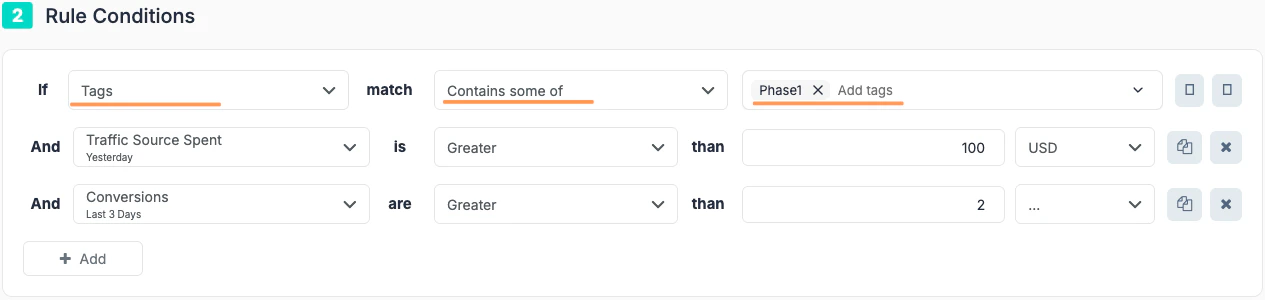
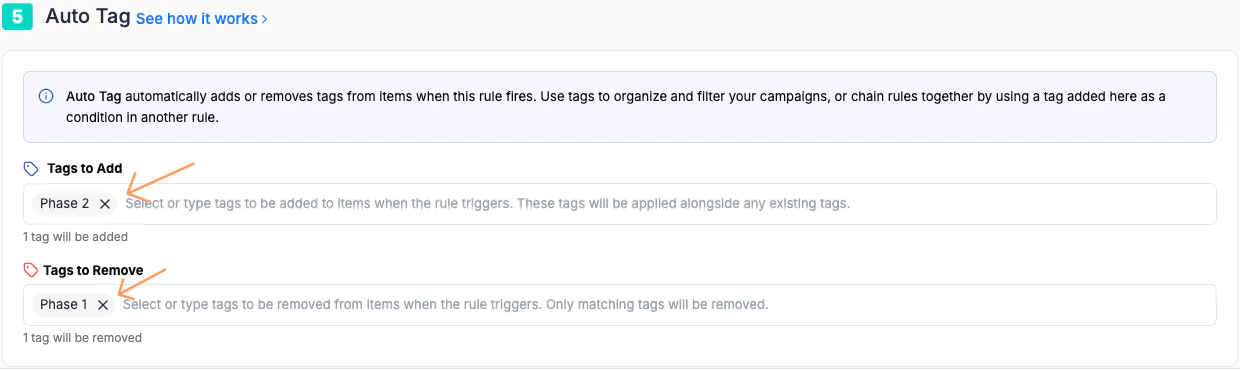
Setting up tags on a rule
When editing any rule, navigate to the Auto Tags section.- Tags to Add — one or more tags applied to every item the rule acts on when it fires.
- Tags to Remove — tags stripped from items when the rule fires (useful for clearing a stage so an item can move to the next one).
This ensures the downstream rule only applies to items that carry that tag.
Example chains
1. The Probation Chain — pause, wait, re-test
Goal: Pause campaigns that lose money, hold them for a cooling-off period, then automatically reactivate them for a second chance before deciding whether to kill them permanently. Why chain this? A direct pause-and-forget rule loses campaigns that may have had a bad day. This chain distinguishes between temporary underperformers and genuine losers.1
Rule 1 — Stop-loss with tagging
Fires when a campaign has spent enough to judge performance and is not profitable.
Action: Pause CampaignTags to Add:
on-probationSchedule: Every 4 hours2
Rule 2 — Reactivate after cooling-off
Fires on campaigns tagged
on-probation that have been paused for at least 3 days.Action: Enable CampaignTags to Add:
retest-round-2 | Tags to Remove: on-probationSchedule: Once daily3
Rule 3 — Final verdict
Fires on campaigns tagged
retest-round-2 that are still unprofitable after their second chance.Action: Pause CampaignTags to Add:
permanent-pause | Tags to Remove: retest-round-2Schedule: Every 4 hours2. The Winner Escalation Chain — validate, scale, clone
Goal: Automatically move profitable campaigns through a structured scaling process — only unlocking larger budget increases and cloning after sustained performance, not just one good day. Why chain this? Scaling too fast on early signals wastes budget on campaigns that regress. This chain requires proof at each stage before moving to the next.1
Rule 1 — Flag potential winners
Fires when a campaign shows early profitability signals.
Action: No action (or Send Notification)Tags to Add:
potential-winnerSchedule: Every 6 hours2
Rule 2 — Confirm and scale budget (Stage 1)
Fires on campaigns tagged
potential-winner that maintain profitability over 3 days.Action: Increase Budget by 30%Tags to Add:
scale-stage-1 | Tags to Remove: potential-winnerSchedule: Once daily3
Rule 3 — Scale to full speed (Stage 2)
Fires on campaigns tagged
scale-stage-1 that are still performing after further spend.Action: Increase Budget by 50%Tags to Add:
scale-stage-2 | Tags to Remove: scale-stage-1Schedule: Once daily4
Rule 4 — Clone the winner
Fires on campaigns tagged
scale-stage-2 with sustained, strong ROAS — duplicating the campaign to expand reach.Action: Clone CampaignTags to Add:
cloned | Tags to Remove: scale-stage-2Schedule: Once daily3. The Creative Fatigue Chain — detect, rotate, retire
Goal: Automatically detect when an ad’s performance is fading, pause it for a rest period, then reactivate it. If performance doesn’t recover, retire it permanently. Why chain this? Creative fatigue is gradual. A single threshold rule either acts too early or too late. This chain catches the decline in stages.1
Rule 1 — Flag fading creatives
Fires on ads that have been running long enough to have a performance baseline but are showing CTR decline.
Action: No action (or Send Notification)Tags to Add:
creative-fatigueSchedule: Every 6 hours2
Rule 2 — Pause fatigued creatives
Fires on ads tagged
creative-fatigue if CTR has not recovered after 48 hours.Action: Pause AdTags to Add:
creative-resting | Tags to Remove: creative-fatigueSchedule: Every 6 hours3
Rule 3 — Reactivate for re-test
Fires on paused ads tagged
creative-resting after 7 days, giving them a fresh start.Action: Enable AdTags to Add:
creative-retest | Tags to Remove: creative-restingSchedule: Once daily4
Rule 4 — Retire if still underperforming
Fires on ads tagged
creative-retest that still aren’t converting after their second chance.Action: Pause AdTags to Add:
creative-retired | Tags to Remove: creative-retestSchedule: Every 6 hours