
How to Create a Naming Template
Click + Create Naming Template next to the name field at any level (campaign, ad set, or ad). The template builder opens.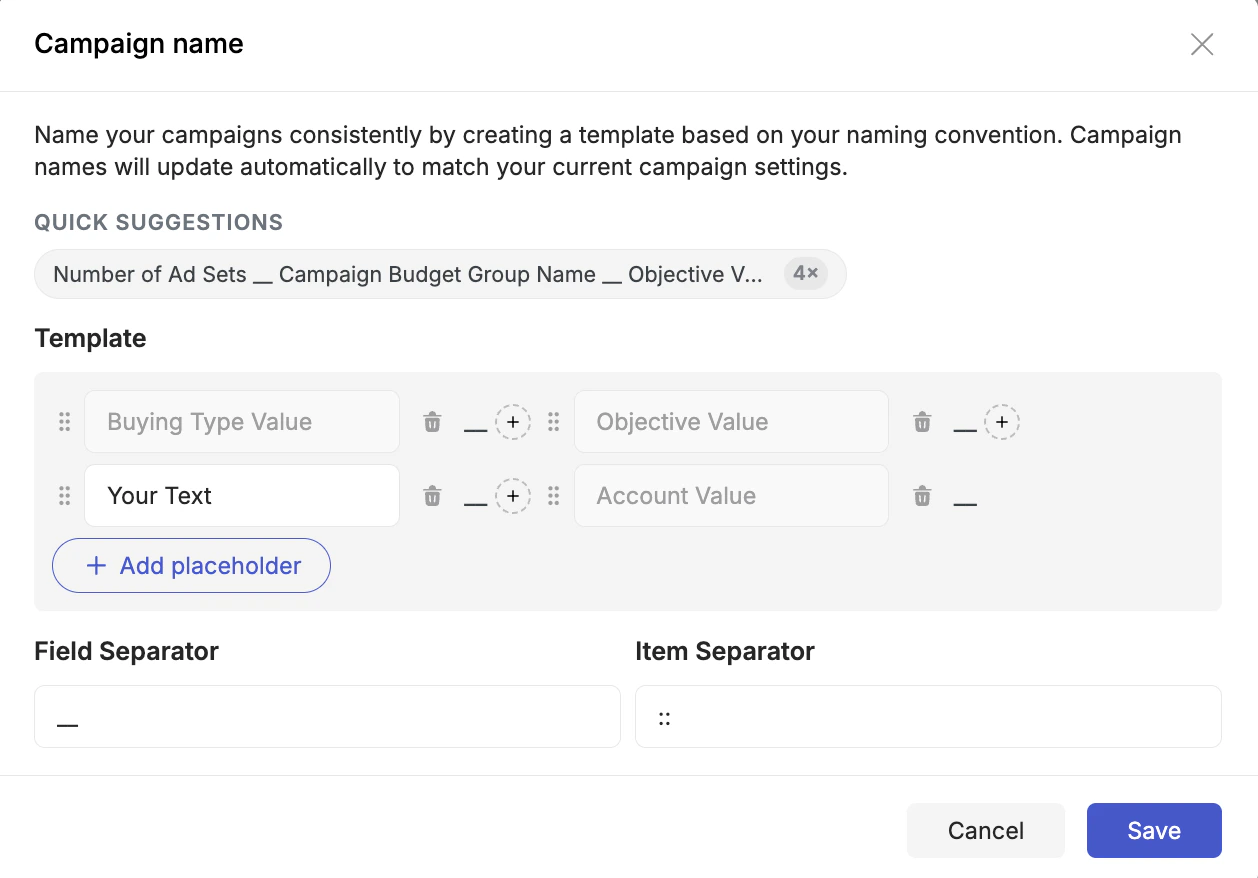
- Quick Suggestions — the top of the dialog shows one or more pre-built combinations of placeholders based on common naming conventions. Click any suggestion to instantly apply it as your starting template. You can then add, remove, or reorder placeholders from there.
- Add placeholders — click + Add placeholder to insert any dynamic value into the name. Placeholders appear as draggable tiles in the template grid — drag them to reorder.
- Mix in static text — any tile you type free text into becomes a fixed string that appears in every name. Use this for prefixes, brand codes, or any text you always want in the name.
- Set separators — the Field Separator controls what appears between placeholders (e.g.,
_,-,|, or a space). The Item Separator controls what appears between multiple values within a single placeholder (e.g., when a placeholder resolves to a list). - Save the template.