
1
Open the Integrations page
In the left navigation, go to Connections → Integrations. Find the Snapchat card and click Connect →. If Snapchat is already connected, open the card and click Connect new account to add another login.
2
Name the profile
Give the connection (the profile) a name you’ll recognize, for example the name of the Snapchat login you’re about to use.
3
Authorise access
You’re sent to Snapchat’s login page. Sign in with the Snapchat account that has access to the ad accounts you want to manage, and approve the access TheOptimizer asks for.
4
Wait for the first sync
Back in TheOptimizer, your Snapchat ad accounts are listed under the integration. Campaigns, ad squads and ads appear after the first sync.
What TheOptimizer asks for
TheOptimizer asks for access to the Snapchat Marketing API — to read your campaigns, ad squads, ads and their stats, and to make the changes you or your rules ask for (status, budgets, bids, names, URLs, clones and new campaigns) — and to your Snapchat public profiles, which Snapchat ads need to show.Profiles and ad accounts
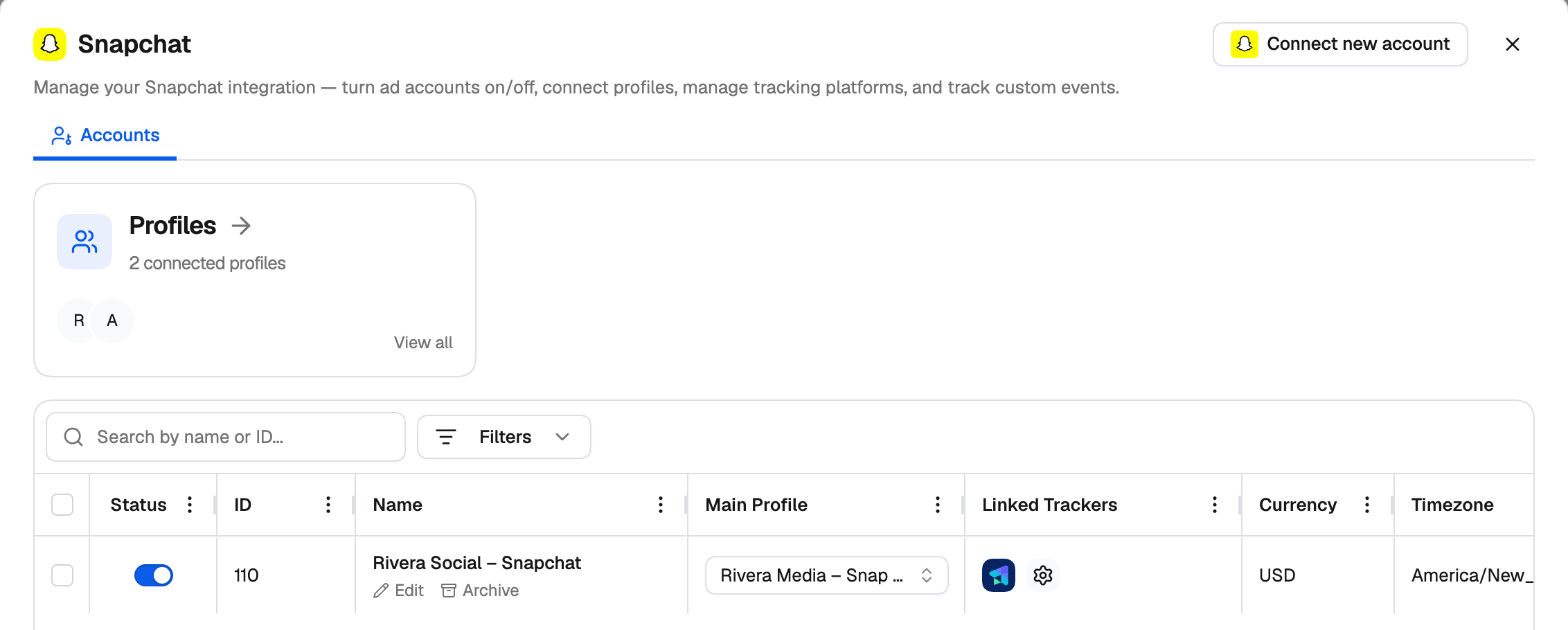
Open the Snapchat card to manage the connection. The table lists each ad account with its status toggle (turn an account on or off), ID, name, Main Profile, linked trackers, currency and time zone. If several profiles can reach the same ad account, pick the one TheOptimizer uses in Main Profile, and switch to another if one stops working or loses access. Profiles at the top lists every Snapchat login you’ve connected. See Ad Networks for how profiles work across networks.Tracking parameters
Snapchat fills in these macros in your URLs, so your tracker can pass the IDs back to TheOptimizer:
Snapchat adds its own click ID (
ScCid) to the landing page URL. Link the ad account with your tracking platform from its Linked Trackers column.
Next steps
Snapchat overview
What you can do with Snapchat in TheOptimizer.
Snapchat Campaign Creator
Launch Snapchat campaigns with every variation built for you.